
Wiki / Cloudflare / Mail after moving DNS
Email stopped working after moving DNS to Cloudflare
Changing nameservers replaces the whole DNS zone, not only the website's address. Mail breaks for one of six reasons, and four commands tell them apart. Messages that senders' servers are still retrying arrive once DNS is fixed; rejected ones have to be sent again.
- Urgency
- High: every hour adds delayed or bounced mail
- Time to fix
- 10–30 minutes in the Cloudflare DNS table, once you know the cause
- When the fix is visible
- New answers within minutes (Auto TTL is 300 seconds); an answer cached before the fix lives until its old TTL runs out
- What you need
- Access to Cloudflare and the old DNS records (the old provider usually still has them)
What you see
- Senders get their messages back, or mail to you simply stops arriving from the hour the nameservers changed.
- Outlook or the phone keeps asking for the password or reports that the server does not respond, while webmail in the browser works.
- Your own messages start landing in spam or are refused, although nothing changed on the mail server.
Why it happens
Until the move, your hosting provider answered every DNS question about the domain: the website, the mail server, SPF, DKIM. After the move Cloudflare answers all of them, from its own copy of the zone. Cloudflare builds that copy with a quick scan that looks for common record names, and says itself that the scan is “not guaranteed to find all existing DNS records”. Its own example of a miss is a DKIM record with a custom selector name.
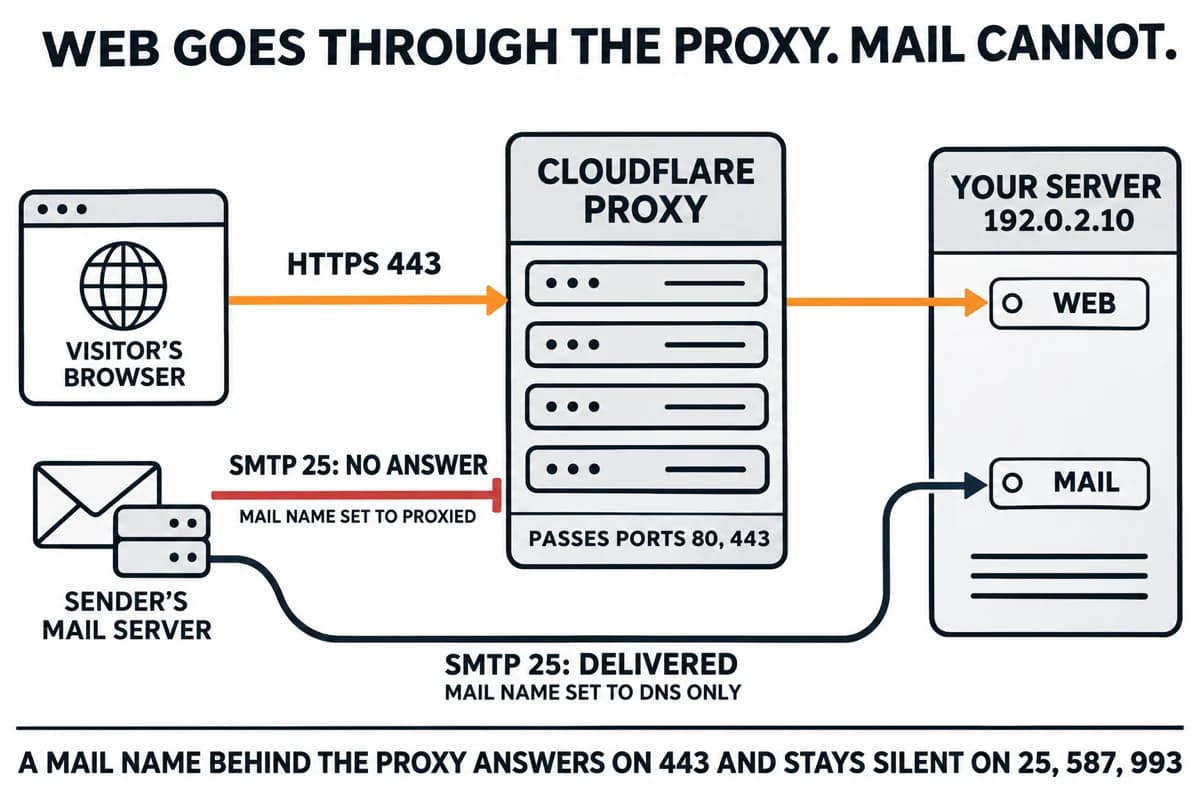
The second trap is the orange cloud. When a domain is added through the dashboard, proxying is on by default. The proxy passes web traffic only: ports 80, 443 and a few alternatives. A name that mail software connects to, such as mail.example.com, stops answering on ports 25, 587 and 993 the moment it is proxied.
Not all mail is lost at once. When the mail server cannot be reached, the sending server keeps the message and retries; RFC 5321 says it should keep trying for at least 4–5 days. A message that was refused outright (for example by Email Routing: no such address) is not retried. After the fix, ask the people whose mail bounced to send it again.
Find the cause
Run these four in order, with your own domain. On Windows: nslookup -type=mx example.com, nslookup -type=txt example.com and, for ports, Test-NetConnection mail.example.com -Port 587 in PowerShell. Each answer points to one cause below.
dig MX example.com | grep statusIf the answer is It means ;; ->>HEADER<<- opcode: QUERY, status: SERVFAIL, id: 19850
The resolver could not get an answer it trusts. Right after a nameserver change the usual reason is a broken DNSSEC chain; the check under that cause tells it apart from nameservers that do not respond. No record in the DNS table will help until this is fixed.Cause: DNSSEC was left on at the registrar ↓ ;; ->>HEADER<<- opcode: QUERY, status: NOERROR, id: 62148
DNS answers. Go to the next command. dig +short MX example.comIf the answer is It means (nothing)
The MX record did not make it into Cloudflare. Senders fall back to the domain's A record, which is your website, not your mail server.Cause: Records were lost in the import ↓ 10 route1.mx.cloudflare.net.
Cloudflare Email Routing holds the MX records instead of your mail provider.Cause: Email Routing took over the MX records ↓ 10 _dc-mx.8915abd75856.example.com.
MX points to a proxied name and Cloudflare substitutes a generated one. This is not what broke mail; note it and go on to the next command.Cause: MX points to a proxied name (a finding, not the breakage) ↓ 10 mail.example.com.
MX is in place. Go to the next command. dig +short A mail.example.comIf the answer is It means 104.21.62.124 172.67.223.197
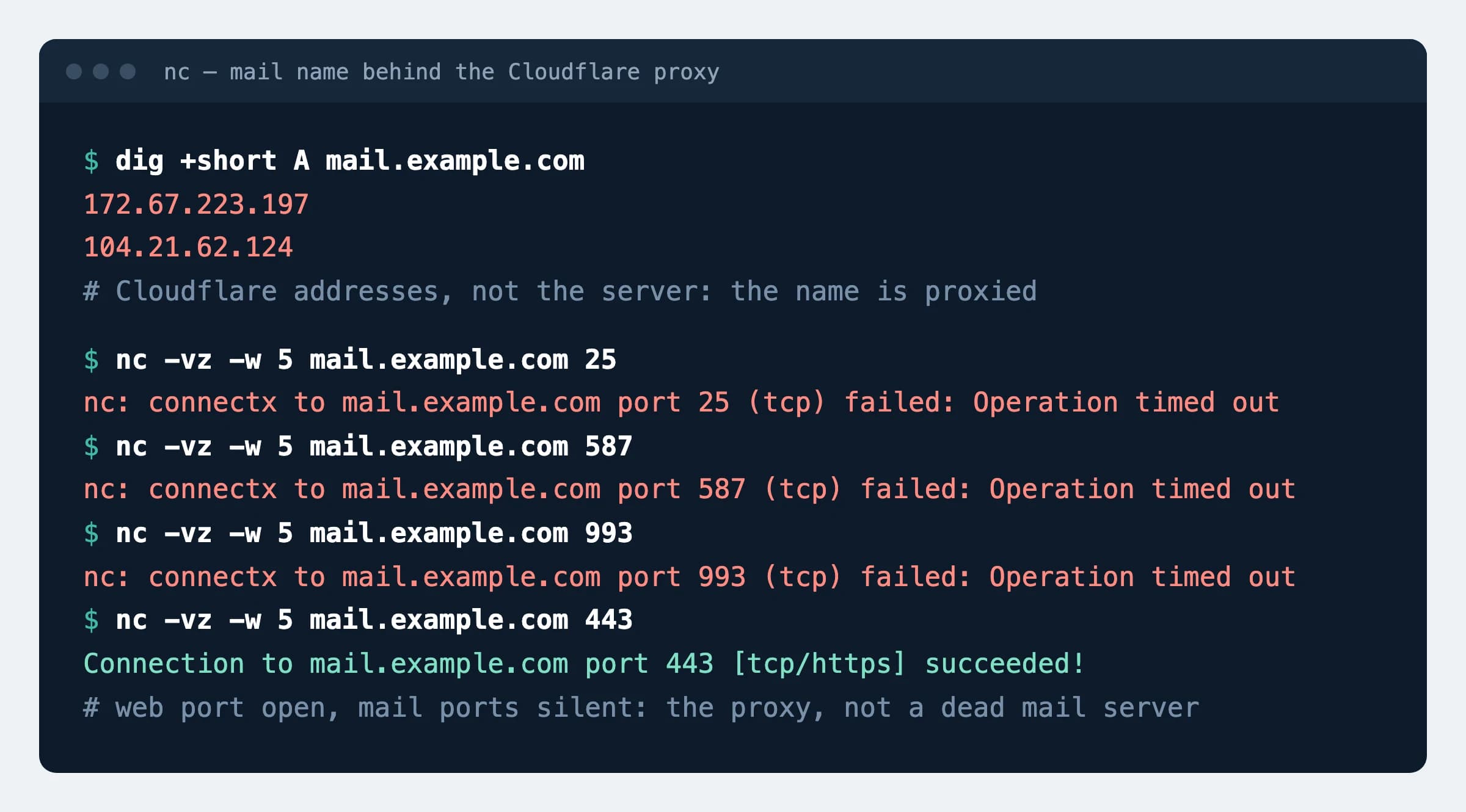
Use the name from the MX answer, then the server name set in your mail program. If the addresses are Cloudflare's (its ranges are published at cloudflare.com/ips; often it is the same pair your website name returns), the mail name is behind the Cloudflare proxy.Cause: The mail host is behind the proxy ↓(no answer)
The mail name has no address record: it was not imported. Ask for AAAAtoo before deciding; a mail server can have an IPv6 address only.Cause: Records were lost in the import ↓192.0.2.10
The mail server's own address (compare with the old zone). Go to the next command. dig +short TXT example.com | grep spf1If the answer is It means (nothing)
The SPF record was not copied. Receivers get SPF result none: your outgoing mail is no longer vouched for.Cause: SPF is missing or doubled ↓"v=spf1 include:_spf.google.com ~all" "v=spf1 include:spf.protection.outlook.com ~all"
Two SPF records. That is an error, not twice the protection.Cause: SPF is missing or doubled ↓ "v=spf1 include:_spf.google.com ~all"
One SPF record. Check that it names every service that sends your mail; if it does and mail still lands in spam, check DKIM.Cause: The DKIM record is missing or altered ↓
1. DNSSEC was left on at the registrar
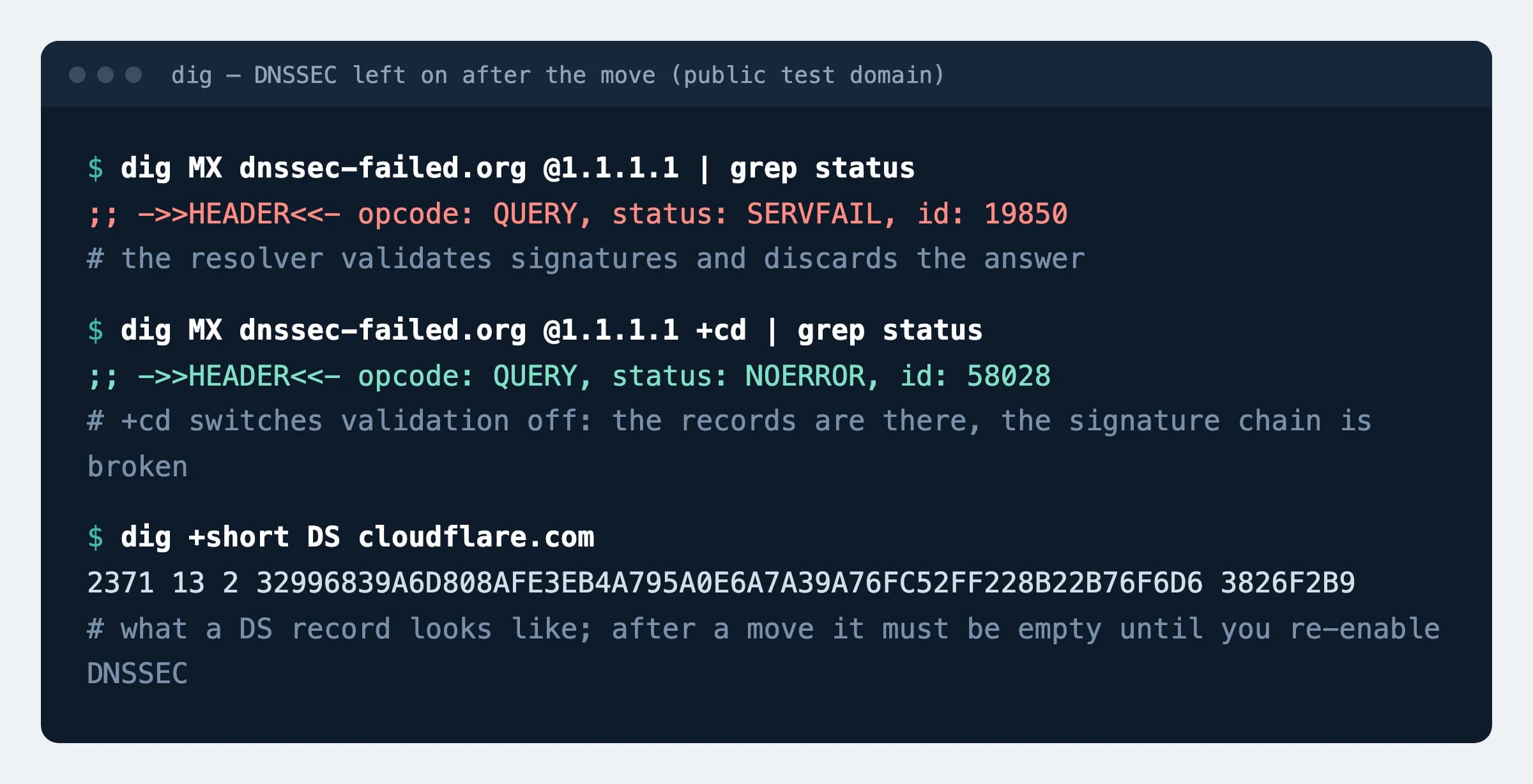
The registrar still publishes the DS record of the old provider (a fingerprint of that provider's DNSSEC key), and Cloudflare's zone has no key that matches it. Validating resolvers, including Google's and Cloudflare's, discard every answer for the domain: mail and often the website too. Cloudflare's setup guide says DNSSEC must be turned off at the registrar before the nameservers are replaced.
How to confirm
dig +short DS example.com
dig MX example.com +cd | grep statusThe answer when this is the cause
2371 13 2 32996839A6D808AF...
;; ->>HEADER<<- opcode: QUERY, status: NOERROR, id: 58028
A DS record exists, and the same question asked with validation switched off (+cd) succeeds. That pair means DNSSEC, not missing records. An empty DS answer rules this cause out.
How to fix it
- At the registrar (where the domain is paid for, not in Cloudflare) remove the DS record or switch DNSSEC off.
- Wait until
dig +short DS example.comreturns nothing. The old DS answer stays cached for up to its TTL, often a day. - When mail works again, turn DNSSEC on in Cloudflare (DNS → Settings) and enter the new DS record at the registrar.
Side effects and limits. Until you re-enable it through Cloudflare the domain has no DNSSEC. That is the normal state of most domains and far better than a signed zone nobody can validate.
2. Records were lost in the import
The quick scan found the website's records but not all the mail records. MX, SPF or the mail host's A record exist at the old provider and are missing in Cloudflare.
How to confirm
dig +short MX example.com @ns1.old-provider.exampleThe answer when this is the cause
10 mail.example.com.Asking the old nameserver directly still returns the record: the old zone is intact, only Cloudflare's copy is incomplete. The old nameserver names are in the provider's panel or in your registrar's history.
How to fix it
- Open the DNS zone at the old provider (or ask for an export, see the message at the bottom) and compare it line by line with Cloudflare's DNS table.
- Add every missing record: MX, the A record of the mail host, TXT records for SPF and DMARC, DKIM records under
_domainkey, autodiscover and autoconfig names. - Set every record that mail uses to DNS only (grey cloud).
Type   Name                 Content                         Proxy
MX     @                    mail.example.com   (priority 10)  DNS only
A      mail                 192.0.2.10                      DNS only
TXT    @                    v=spf1 mx ~all                  DNS only
TXT default._domainkey v=DKIM1; k=rsa; p=MIIB... DNS onlySide effects and limits. Do it before the old provider deletes the zone; after that the only copy is in their backups.
3. The mail host is behind the proxy
The A record of the name that mail programs connect to has the orange cloud. Web requests to it work; mail connections get no answer.
How to confirm
nc -vz -w 5 mail.example.com 587The answer when this is the cause
nc: connectx to mail.example.com port 587 (tcp) failed: Operation timed outOn our proxied names ports 25, 587 and 993 gave no answer within 5 seconds, while port 443 was open. Web open and mail silent, together with Cloudflare addresses in the previous command, is the proxy and not a dead mail server. Many home connections block outgoing port 25, so judge by 587 or 993.
How to fix it
- In Cloudflare, open DNS → Records and find the A (or CNAME) record of the mail name.
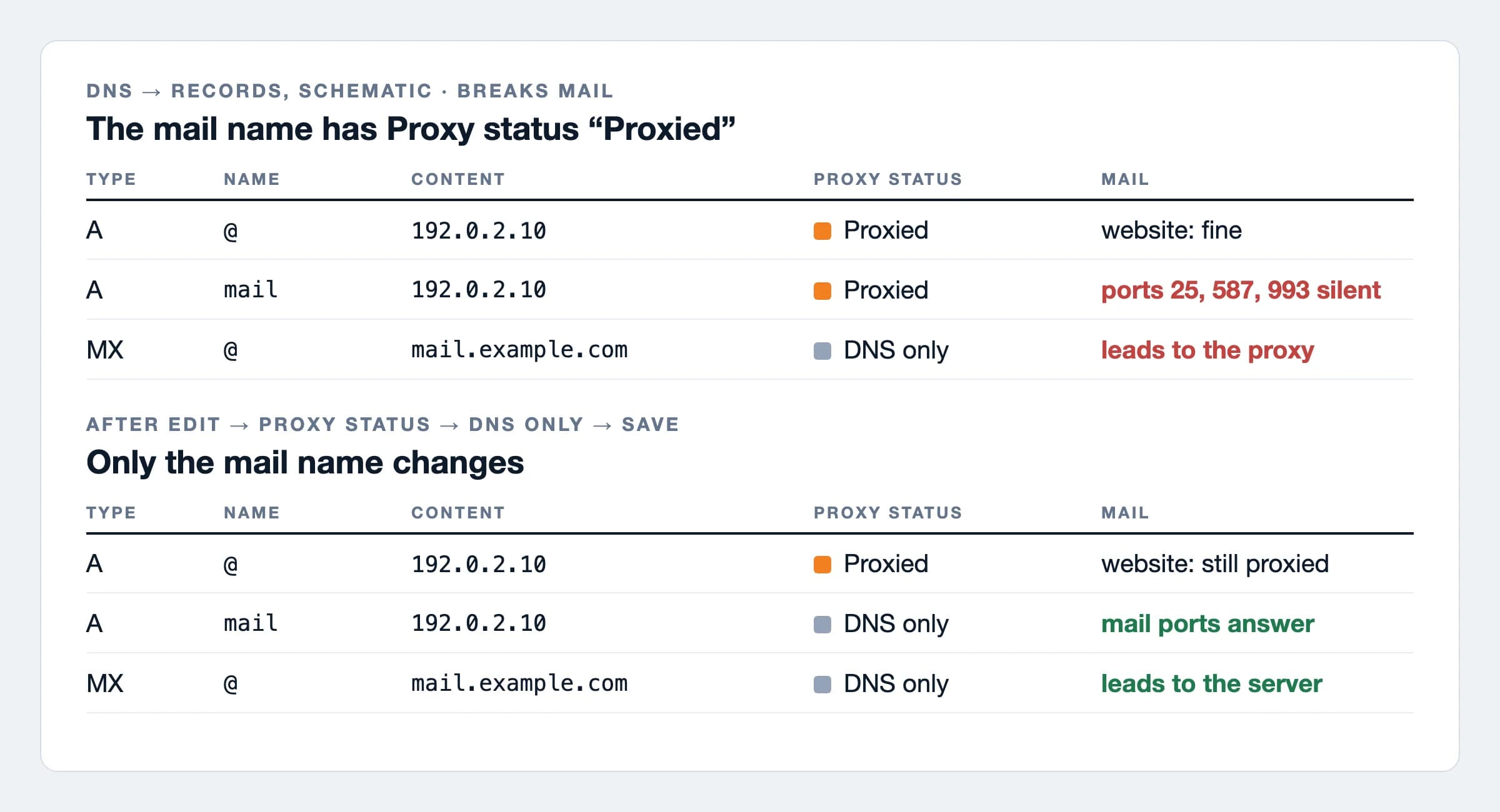
- Click Edit, switch Proxy status from Proxied to DNS only, save.
- Do the same for every name mail programs connect to:
mail,smtp,imap,pop. Awebmailname that is only opened in a browser can stay proxied.
Side effects and limits. A DNS-only record shows the server's real address. Cloudflare warns: if the mail server is on the same IP as the website, the record exposes the address the proxy was hiding. The clean solution is mail on a different address than the website; the practical one is a firewall on the server that accepts web traffic only from Cloudflare.
4. MX points to a proxied name (a finding, not the breakage)
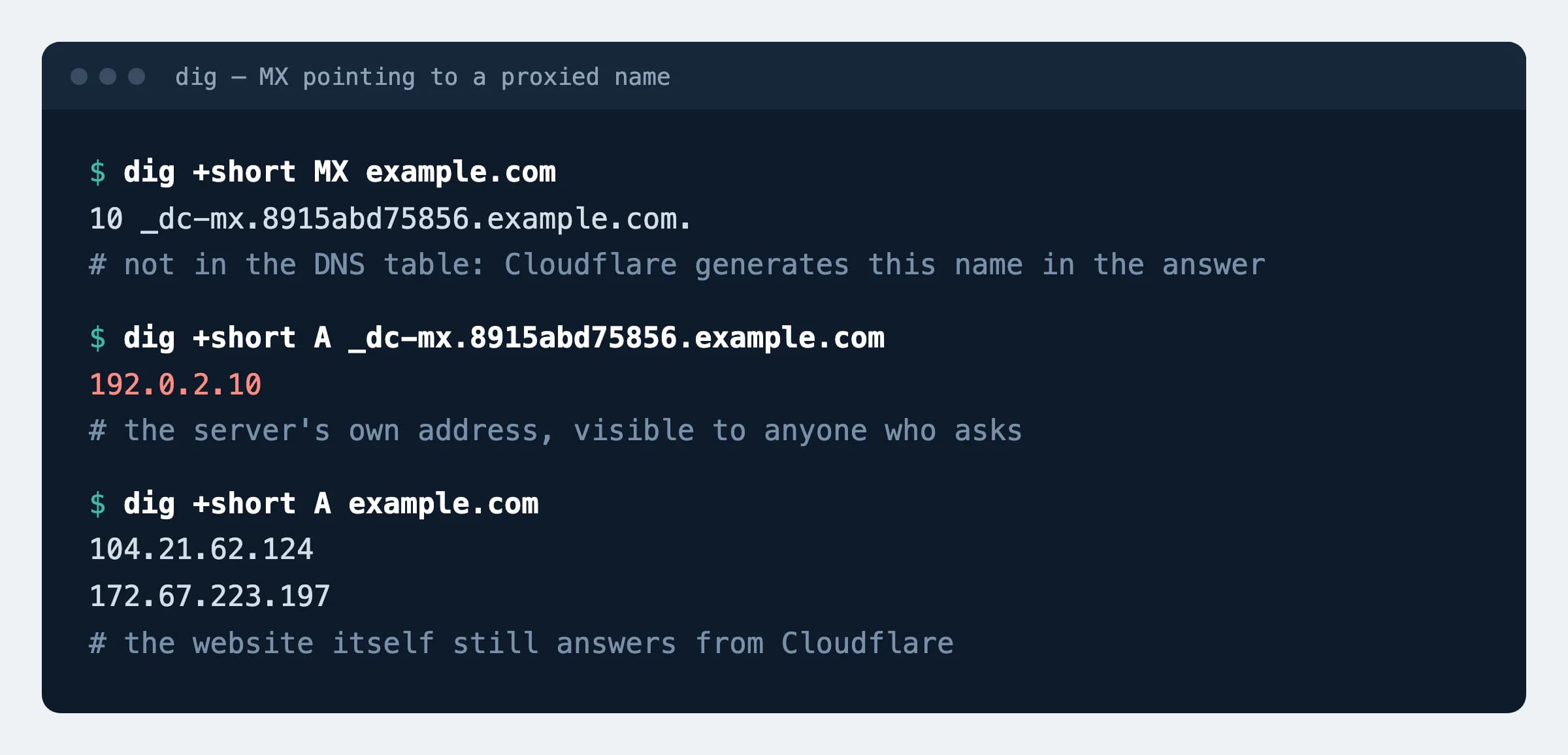
The MX record names the same host as the website (often the bare domain), and that host is proxied. Cloudflare notices and quietly answers with a generated _dc-mx name that leads straight to your server.
How to confirm
dig +short A _dc-mx.8915abd75856.example.comThe answer when this is the cause
192.0.2.10The generated name resolves to the origin address, so senders are sent straight to your server, past the proxy. Cloudflare calls these records safe. It is not in the DNS table and cannot be deleted; it disappears when MX points to a DNS-only name.
How to fix it
- Create a separate A record for mail, for example
mail, with the mail server's address, DNS only. - Change the MX record to point to that name.
- Check that the
_dc-mxname is gone from the answer.
Type   Name   Content                           Proxy
A      @      192.0.2.10                        Proxied
A      mail   192.0.2.10                        DNS only
MX @ mail.example.com (priority 10) DNS onlySide effects and limits. Same trade-off as above: the mail name shows the server's address. The _dc-mx record showed it already, so nothing gets worse.
_dc-mx name that leads to the server.5. SPF is missing or doubled
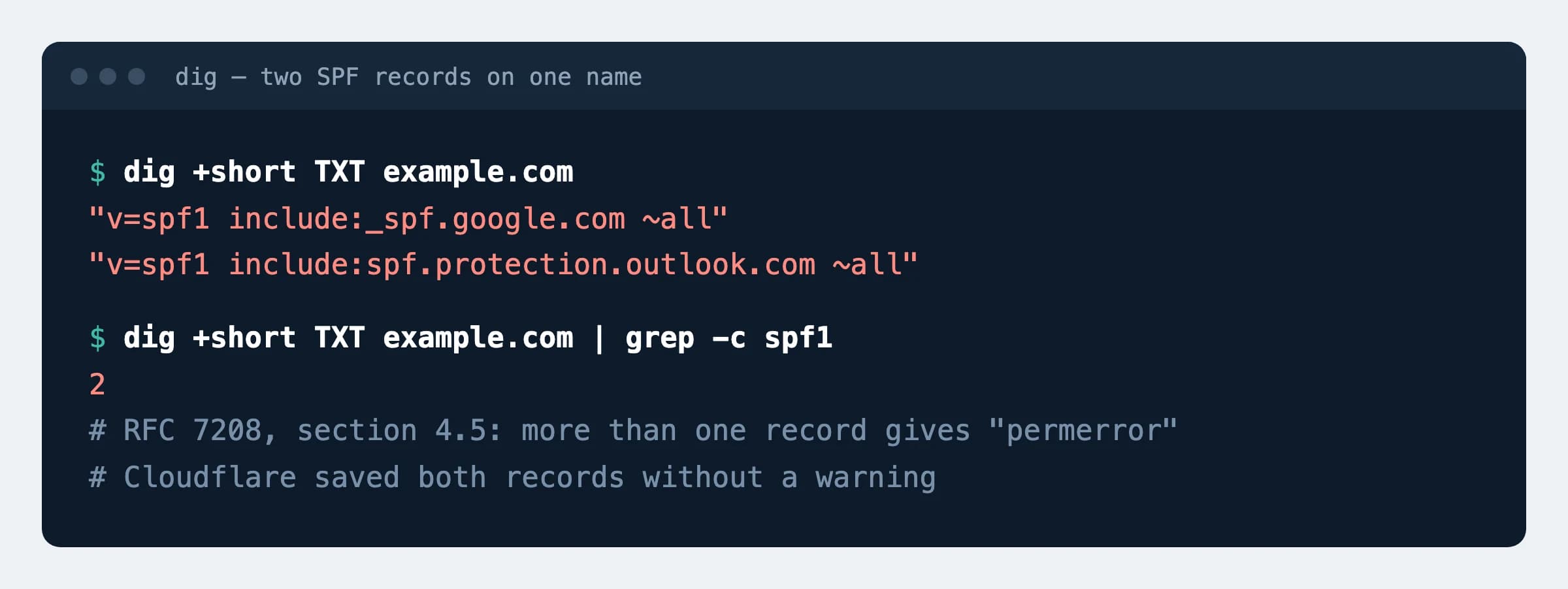
Either the SPF record was not imported, or a second one was added next to it (the mail provider's wizard, a newsletter service, Email Routing). RFC 7208 allows one: with more than one, the check returns permerror and receivers treat the mail as unauthenticated.
How to confirm
dig +short TXT example.com | grep -c spf1The answer when this is the cause
2The count must be 1. In our test the Cloudflare API saved both records with no error and no warning.
How to fix it
- Keep one TXT record that starts with
v=spf1and merge the senders into it. - Delete the other one.
- Check the lookup limit: RFC 7208 allows 10 terms that cause DNS lookups per check, and
include,a,mx,ptr,existsandredirectall count, including the ones inside the records you include.
v=spf1 include:_spf.google.com include:spf.protection.outlook.com ~allSide effects and limits. A sender left out of the merged record starts failing SPF. List who sends mail in your name before you delete anything.
6. The DKIM record is missing or altered
DKIM records live under names the scan cannot guess (selector._domainkey). Providers that publish DKIM as a CNAME also break when that CNAME is proxied or flattened.
How to confirm
dig +short TXT default._domainkey.example.comThe answer when this is the cause
(nothing)Take both parts from the DKIM-Signature header of a message you sent: s= is the selector (here default), d= is the domain. An empty answer means receivers cannot verify your signature.
How to fix it
- Copy the DKIM record from the old zone. Generate a new key only in the mail provider's panel, so that the server signs with the same key you publish.
- If it is a CNAME, set it to DNS only; on a paid plan also check that “CNAME flattening for all CNAME records” is off.
- Send a message to a Gmail address and open “Show original”: the DKIM line must say PASS.
7. Email Routing took over the MX records
Someone switched on Cloudflare Email Routing. It needs the domain's MX records for itself: with another provider's MX in place it refuses to start (error 2008), so the provider's records were removed to make it work. Mail now goes to Cloudflare's forwarder, not to your mailboxes.
How to confirm
dig +short MX example.comThe answer when this is the cause
10 route1.mx.cloudflare.net.
20 route2.mx.cloudflare.net.
30 route3.mx.cloudflare.net.
Names ending in mx.cloudflare.net mean Cloudflare receives the mail. Per Cloudflare's documentation, mail to an address with no forwarding rule is rejected with “Address does not exist”, and the sender does not retry.
How to fix it
- Decide which one you need. Email Routing only forwards; it has no mailboxes and cannot send.
- To return to the mail provider, first write down the current SPF record, then unlock the Email Routing records in DNS → Records.
- Add the provider's MX records and DKIM as new records, and put the provider into the one SPF record.
- Send a test message from outside. When it reaches the mailbox, turn Email Routing off, then repeat the MX and SPF commands and send one more test: switching it off deletes records.
Side effects and limits. Turning Email Routing off deletes every record it created, even ones you edited to point elsewhere. That is why the provider's records must be new records, not edited copies; if the SPF record was created by Email Routing, add it again afterwards.
What the Cloudflare DNS API lets through
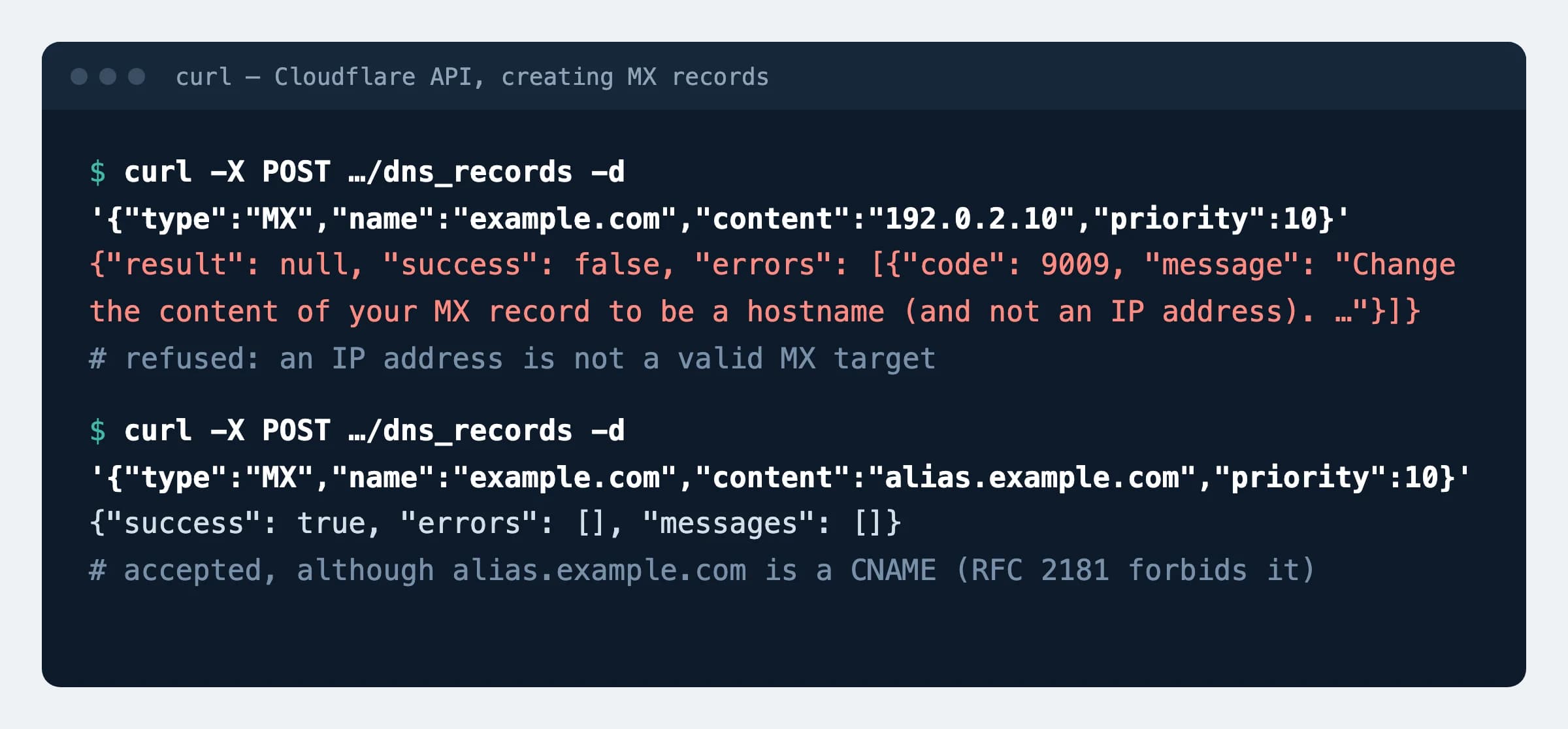
We entered five questionable mail setups through the API. One was refused. Saving is not validation: a record that saves is not a record that works.
| What we entered | Cloudflare's answer | Result for mail |
|---|---|---|
| MX with an IP address as content | Refused, error 9009: “Change the content of your MX record to be a hostname (and not an IP address)” | None: the record is not created |
| MX pointing to a name that is a CNAME | Accepted, no warning | Invalid MX target under RFC 2181, section 10.3: point MX to a name with its own A record |
| Two SPF records on one name | Accepted, no warning | SPF permerror (RFC 7208, section 4.5) |
| A record of the mail host set to Proxied | Accepted, no warning | Ports 25, 587, 993 do not answer |
| MX pointing to a proxied name | Accepted; answers carry a generated _dc-mx name | Senders are sent to the server directly; its address is visible |
Our data
28.4 %
of .lt mail domains whose website answers from Cloudflare's network have no SPF record
Elsewhere the share is 11.5 %: 2,059 of 7,253 domains against 6,626 of 57,657. DMARC goes the other way: it is missing on 58.3 % of the Cloudflare group and on 69.8 % of the rest. The figure shows that the two go together, not which caused which: the dataset records where the website answers from, not who hosts the DNS zone or when it was moved. Dataset: Security posture of .lt websites, 16 November 2026 (CC BY 4.0)
Check that it works
Ask a public resolver as well as your own computer: each keeps its own cache. Then test the port mail programs use.
dig +short MX example.com @1.1.1.1
dig +short A mail.example.com @1.1.1.1
nc -vz -w 5 mail.example.com 587Expected
10 mail.example.com.
192.0.2.10
Connection to mail.example.com port 587 [tcp/submission] succeeded!
Then send one message from an outside address to yours and one back, and read Authentication-Results in the received one: spf=pass and dkim=pass, and dmarc=pass if the domain has a DMARC record. DMARC passes only when the domain that passed SPF or DKIM matches the one in From. If a resolver still shows the old answer, it cached it before the fix; the nameserver change itself can take up to 24 hours at the registrar.
Where it comes from and what it leads to
Where it comes from
- Nameservers were switched before the imported records were compared with the old zone, or before DNSSEC was turned off at the registrar.
- “Proxy everything” was applied to all records to hide the server's address.
- Email Routing was switched on for a domain that already had mailboxes elsewhere.
What it leads to
- Mail server (MX): the domain has no MX recordsNo MX at all: senders fall back to the domain's A record
- SPF record: no SPF record foundSPF record not found
- DKIM signature: no DKIM record found with the usual selectorsDKIM record not found
- DMARC record: no DMARC record foundWith SPF and DKIM both failing, a strict DMARC policy rejects your own mail
What to write to the hosting provider
No access to the old DNS panel? Send this to the previous hosting provider. They keep the zone for some time after the nameservers leave.
Hello,

the nameservers of example.com were moved to another provider on [date]. Please send me a full export of the DNS zone as it was before that date: all records, including MX, TXT (SPF, DMARC), everything under _domainkey, and the autodiscover/autoconfig names.

Please do not delete the zone until I confirm.

Thank you.Sources
- Cloudflare Docs: DNS records quick scan (what the import may miss)
- Cloudflare Docs: Proxy status (which records can be proxied)
- Cloudflare Docs: Network ports the proxy passes
- Cloudflare Docs: Email issues
- Cloudflare Docs: Unexpected DNS records (_dc-mx)
- Cloudflare Docs: Email Service, domains (error 2008, locked records)
- Cloudflare Docs: Time to live (TTL)
- Cloudflare Docs: Full setup, step 3.3 “Turn off DNSSEC”
- RFC 7208: Sender Policy Framework, sections 3.2, 4.5 and 4.6.4
- RFC 2181, section 10.3: MX and NS records
- RFC 5321: Simple Mail Transfer Protocol, sections 4.5.4.1 and 5.1
- Cloudflare: IP ranges
How we tested
Commands were run on 24 November 2026 against a test subdomain in a live Cloudflare zone (Free plan); the test records were deleted afterwards. The domain is shown as example.com and the server address as 192.0.2.10; Cloudflare's own addresses and replies are unchanged. The port test with full output was repeated on a second proxied name of ours; the DNSSEC failure is shown on the public test domain dnssec-failed.org. The old-nameserver answer and the Email Routing answer are the expected ones, not our own runs.