
Wiki / Email
Info: DKIM signature
We looked for a DKIM key under 16 common selector names and found none. Either your mail is not signed or it uses another name: DNS cannot list selectors, so this line is informational, and one message you have sent settles it.
What it does not mean. It does not prove your mail is unsigned. We try only these names: default, dkim, mail, google, selector1, selector2, k1, s1, s2, smtp, mx, email, dkim1, key1, zoho, protonmail. The Google Workspace default google and Microsoft 365's selector1 and selector2 are on the list; date-based selectors or the names newsletter services use, for example, are not.
- In our report
- Info (grey), not counted in the score; category weight 0.8 of 2.0
- Time to fix
- 2 minutes to check; 15 minutes to switch on, then up to 48 hours until it works (Google)
- Can it break things
- No: adding a key rejects nothing. Only a DMARC policy rejects
How to fix it
First find out whether your mail is signed. Send a message to a mailbox of yours elsewhere and open its headers (Gmail: “Show original”).
1. Find the selector in a message header
DKIM-Signature: v=1; a=rsa-sha256; d=example.com; s=dkim; ...Header format as defined in RFC 6376: s= is the selector, d= the domain. The key then lives at dkim._domainkey.example.com. No such header: the mail is not signed.
Google Workspace (path from Google's documentation)
Admin console: Menu > Apps > Google Workspace > Gmail > Authenticate email
Generate New Record > (publish the TXT record google._domainkey) > Start authenticationChoose the 2048-bit key; 1024 only if your DNS host does not accept the longer one. The default selector is google.
Microsoft 365 (path from Microsoft's documentation)
security.microsoft.com/authentication?viewid=DKIM
Email & collaboration > Policies & rules > Threat policies > Email authentication settings > DKIM
Sign messages for this domain with DKIM signaturesBefore the toggle works, two CNAME records go into DNS: selector1._domainkey and selector2._domainkey. Copy the values from the portal: since May 2025 they end in dkim.mail.microsoft for new domains.
Your own server: the DNS record
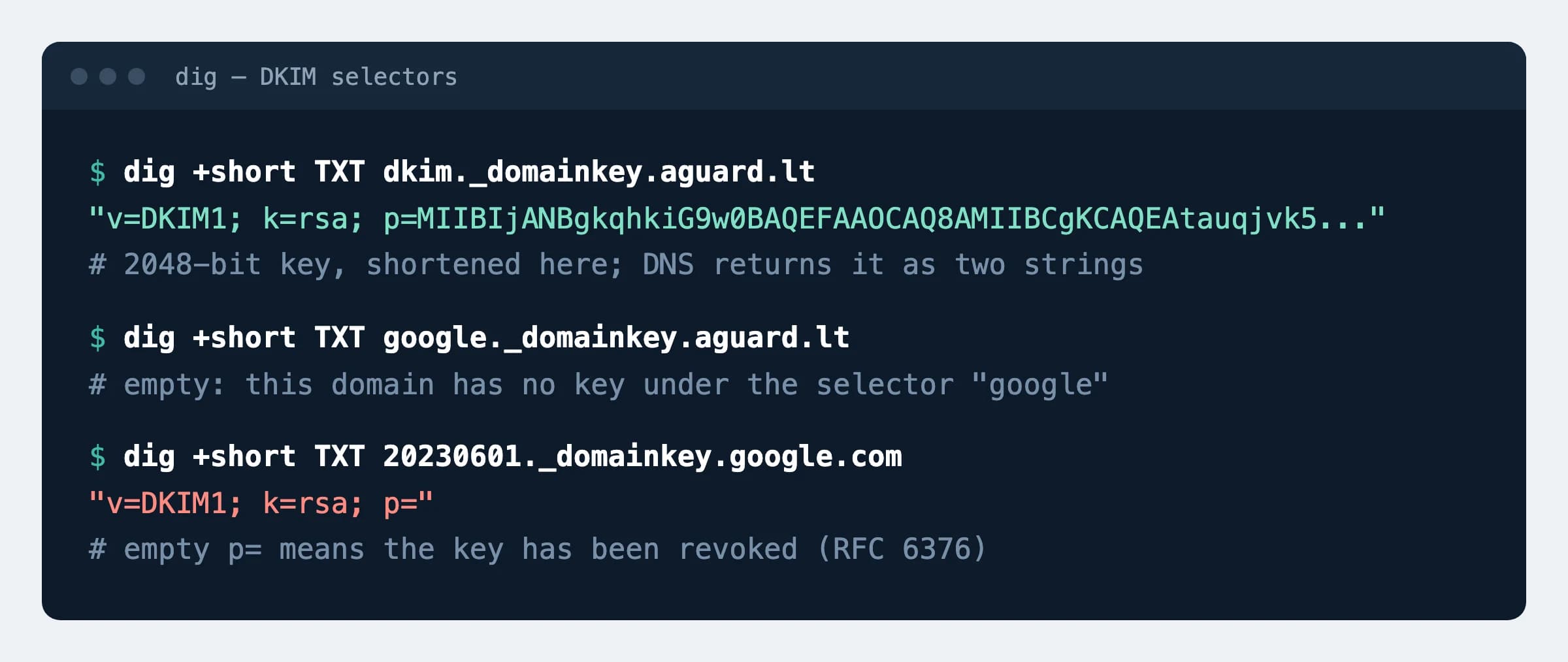
dkim._domainkey TXT "v=DKIM1; k=rsa; p=MIIBIjANBgkqhkiG9w0BAQEFAAOCAQ8A..."This is aguard.lt's record (key shortened). The key pair is generated by your mail software or hosting panel. A 2048-bit key does not fit into one 255-character TXT string, so DNS returns it in two parts; that is normal.
How to check
dig +short TXT dkim._domainkey.aguard.ltExpected
"v=DKIM1; k=rsa; p=MIIBIjANBgkqhkiG9w0BAQEFAAOCAQ8A..."Put your own selector and domain in place of dkim and aguard.lt. An empty result: no key under that name. The final proof is the Authentication-Results header of a received message showing dkim=pass.
p=.Possible values
| Key | Status | Source |
|---|---|---|
| RSA 2048-bit | Choose this | RFC 8301: signers should use at least 2048; Google recommends it too |
| RSA 1024-bit | The minimum allowed | RFC 8301; Gmail requires 1024 or longer. The default in Microsoft 365 PowerShell |
| RSA below 1024 | Obsolete: the signature is treated as invalid | RFC 8301 (2018) |
rsa-sha1 signature | Obsolete: must not be used | RFC 8301 (2018) |
| Ed25519 | Standardised, but the Google and Microsoft panels offer RSA only | RFC 8463 (2018) |
Empty p= | The key has been revoked | RFC 6376; example: google.com's selector 20230601 |
Sources
- RFC 6376: DKIM Signatures (Internet Standard)
- RFC 8301: DKIM algorithm and key usage update, 2018
- RFC 8463: Ed25519 signatures for DKIM, 2018
- RFC 8601: the Authentication-Results header
- Google: set up DKIM for Google Workspace
- Microsoft: set up DKIM for your custom domain
- Google: email sender guidelines
Changes
- Page published; key lengths checked against RFC 8301, menu paths against Google's and Microsoft's documentation.