
Wiki / Exposed files
Risk: Publicly accessible
A copy of wp-config.php with a different extension was left in the site folder. The server no longer runs it as PHP and sends it as text: database name, user, password and the WordPress security keys. Delete the copy today and change the password and the keys.
What it does not mean. It does not mean wp-config.php itself is open: the server executes that file and returns an empty response to a browser. Nor is it proof that someone has already downloaded the copy: the access log shows that.
- In our report
- Risk (red), the highest category weight, 2.0
- Time to fix
- 10 minutes to delete and block; as long again for the password and keys
- Can it break things
- Deleting the copy: no. New keys make every user log in again
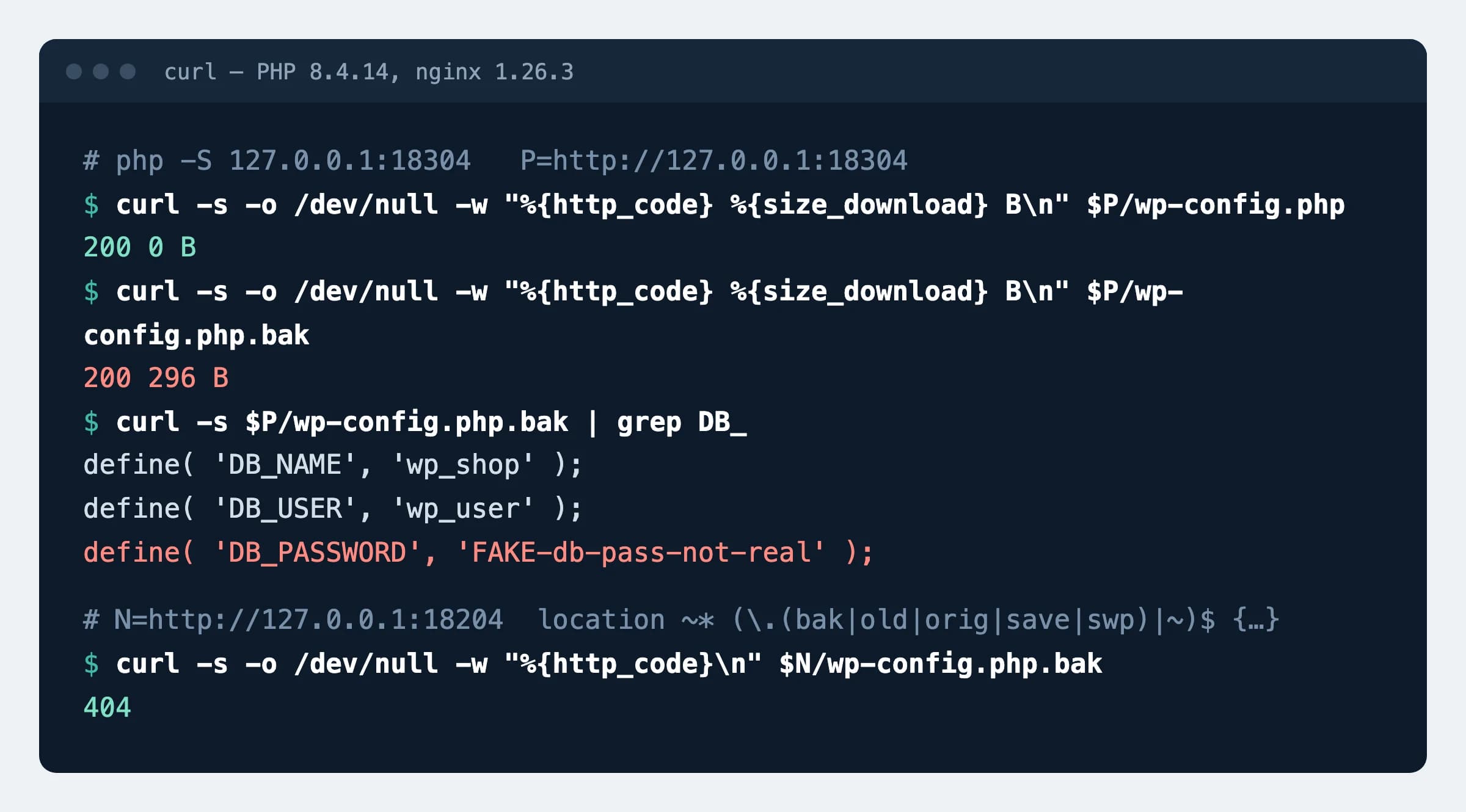
.php is executed and returns nothing, .php.bak is sent whole. Below, nginx 1.26.3 after the rule. The password in the example is made up.How to fix it
The check tries three names: wp-config.php.bak, wp-config.php.old and wp-config.bak. Others are just as dangerous: wp-config.php~ is left by the nano editor with its backup option on, and .wp-config.php.swp is created by Vim while the file is being edited.
First: find and delete the copies
find . -type f \( -name "*.bak" -o -name "*.old" -o -name "*.orig" -o -name "*.save" -o -name "*~" -o -name "*.sw[op]" \)Run it in the site folder and read the list. If none of the files is needed, repeat the command with -delete at the end. On the test server it found all seven test copies.
nginx (tested on 1.26.3)
location ~* (\.(bak|old|orig|save|swp)|~)$ {
    return 404;
}On the test server the response for nine copies changed from 200 to 404, in upper case and with ?x=1 appended too; index.html and style.css stayed at 200. The rule also covers copies that appear later.
Apache (tested on 2.4.59, also works in .htaccess)
RedirectMatch 404 "(?i)(\.(bak|old|orig|save|swp)|~)$"Needs mod_alias. Same result on the test server as with nginx.
After deleting: new keys and password
curl -s https://api.wordpress.org/secret-key/1.1/salt/The official generator returns eight define() lines (AUTH_KEY, SECURE_AUTH_KEY, LOGGED_IN_KEY, NONCE_KEY and the four ..._SALT ones): replace the same lines in wp-config.php with them. Change the database password in the hosting control panel or with the MySQL statement ALTER USER 'user'@'localhost' IDENTIFIED BY 'new'; (from the MySQL documentation, not run on our test server) and write the same value to DB_PASSWORD.
How to check
curl -s -o /dev/null -w "%{http_code}\n" https://example.com/wp-config.php.bakExpected
404Repeat with /wp-config.php.old and /wp-config.bak. A 200 response means the copy is still being served.
What can break
- New keys log out every signed-in user, shop customers included; they have to log in again.
- If you change the database password without writing it to
wp-config.php, the site can no longer connect to the database. Change both places in one go. - The rule answers 404 for every address ending in
.bak,.old,.orig,.save,.swpor~. If you serve such files to visitors on purpose, rename them.
Our data
20
of 73,386 inspected .lt websites (0.03%) serve a copy of wp-config.php. Dataset, 16 November 2026
Sources
- WordPress developer documentation: wp-config.php (database constants, keys, generator address)
- MySQL 8.4 documentation: ALTER USER
- nginx documentation: location
- Apache documentation: RedirectMatch
- Vim documentation: recover (.swp files)
- GNU nano documentation: the --backup option
- AGuard: security dataset of Lithuanian websites, DOI 10.5281/zenodo.24282573
Changes
- Page published; nginx and Apache rules tested on a test server.