
Wiki / Website hacked / Google and browser warnings
Google says “This site may be hacked” or Chrome shows “Dangerous site”
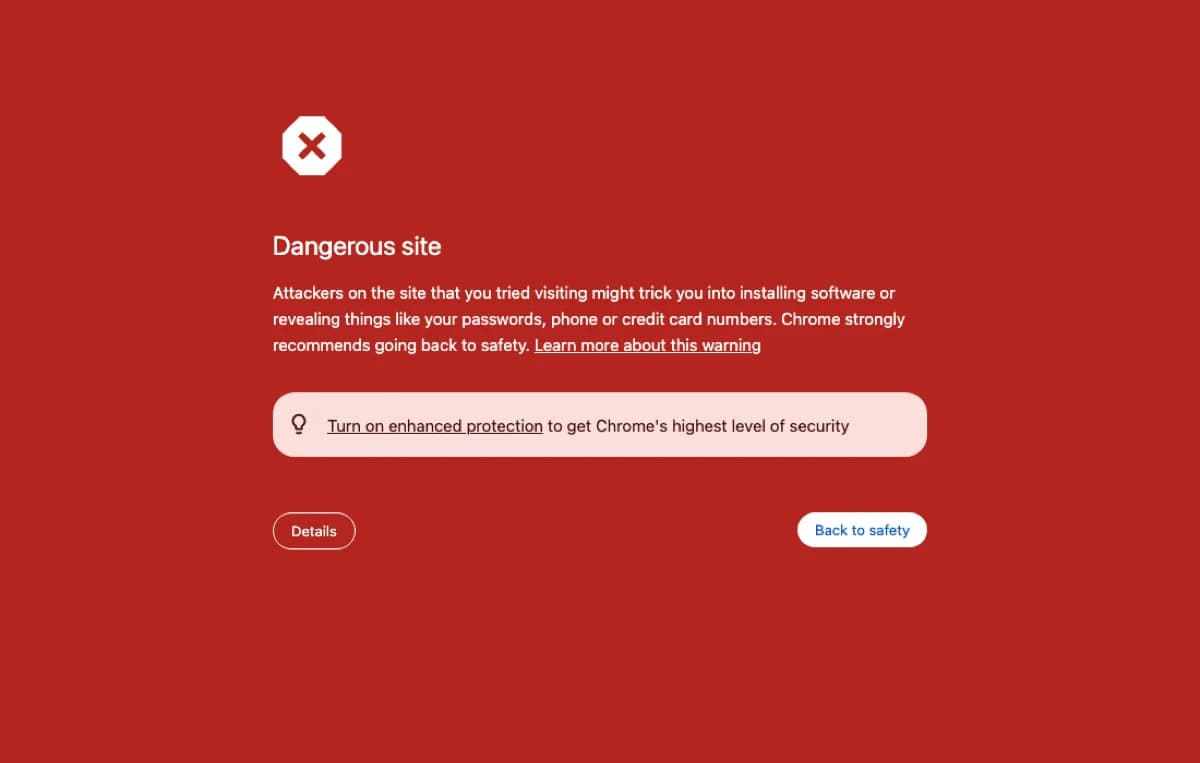
These are two different warnings. “This site may be hacked” under a search result means Google believes someone changed your pages or added spam pages. The red “Dangerous site” page in Chrome means Safe Browsing found phishing, malware or unwanted software. Google does not remove either until the site is cleaned; after the cleanup you request a review in Search Console. A hacked site can also go for days with no warning at all.
- Urgency
- High: Chrome stops visitors at the red page, and spam pages keep entering Google's index every day
- Time to fix
- Hours to days for the cleanup; Google's review then takes “from a few days to a few weeks”
- When the fix is visible
- After the review is approved. Google's older guide says warnings are removed within 72 hours of approval
- What you need
- Verified ownership in Search Console, access to the files on the server, and a clean copy of your CMS in the same version
What you see
- In Google Search, under your result: “This site may be hacked” or “This site may harm your computer”.
- In Chrome, instead of your site: a red page headed “Dangerous site”. Chrome now uses this one heading for phishing, malware and unwanted software; only the paragraph under it differs. “Deceptive site ahead” is what Firefox shows and what older guides describe.
- The site looks normal when you open it, but a search for your name shows products, medicines or Japanese text you never published, or Search Console counts thousands of pages you do not have.
- An email from Search Console says a new owner was added to your property. Google calls this a strong sign of a hack.
Why it happens
Two separate Google systems produce these warnings. Google Search puts “This site may be hacked” under a result when it believes “a hacker might have changed some of the existing pages on the site or added new spam pages”. Safe Browsing keeps a list of sites with phishing, malware and unwanted software, and Chrome shows the red page for a site on that list. Both findings appear in one place, the Security issues report of Search Console, each with a category name and sample addresses.
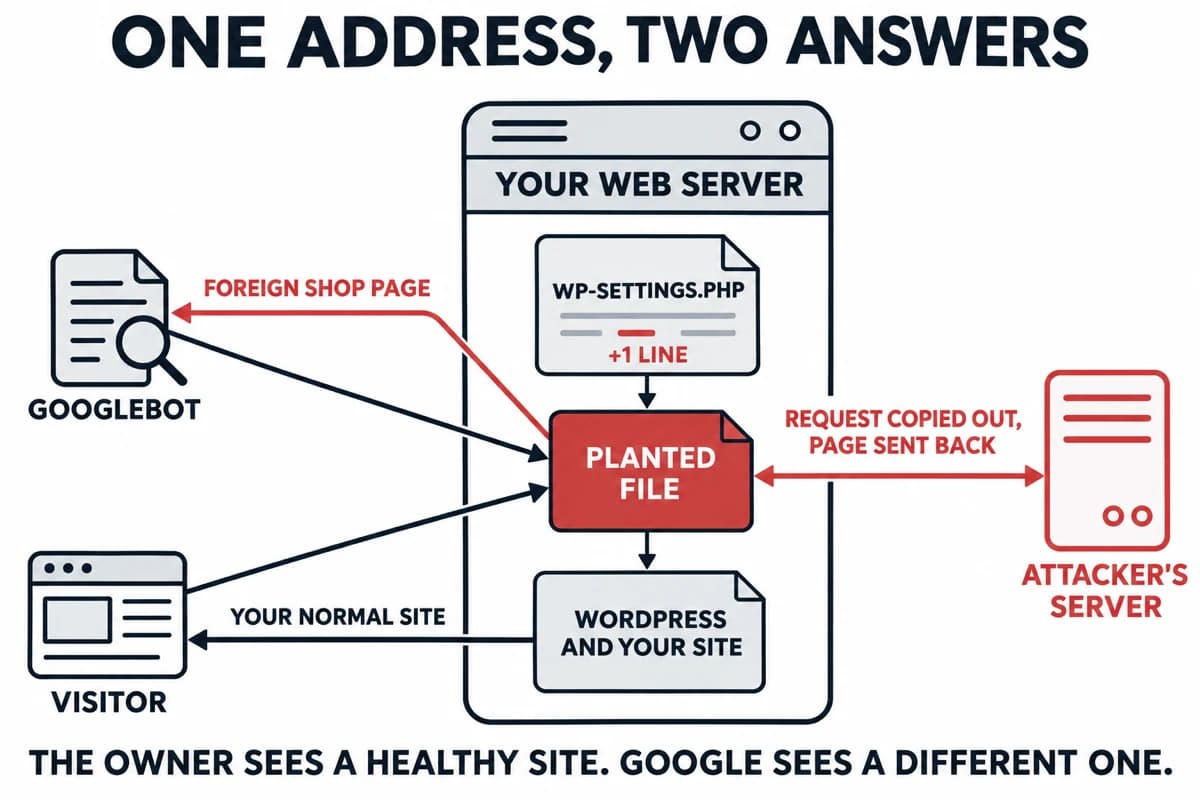
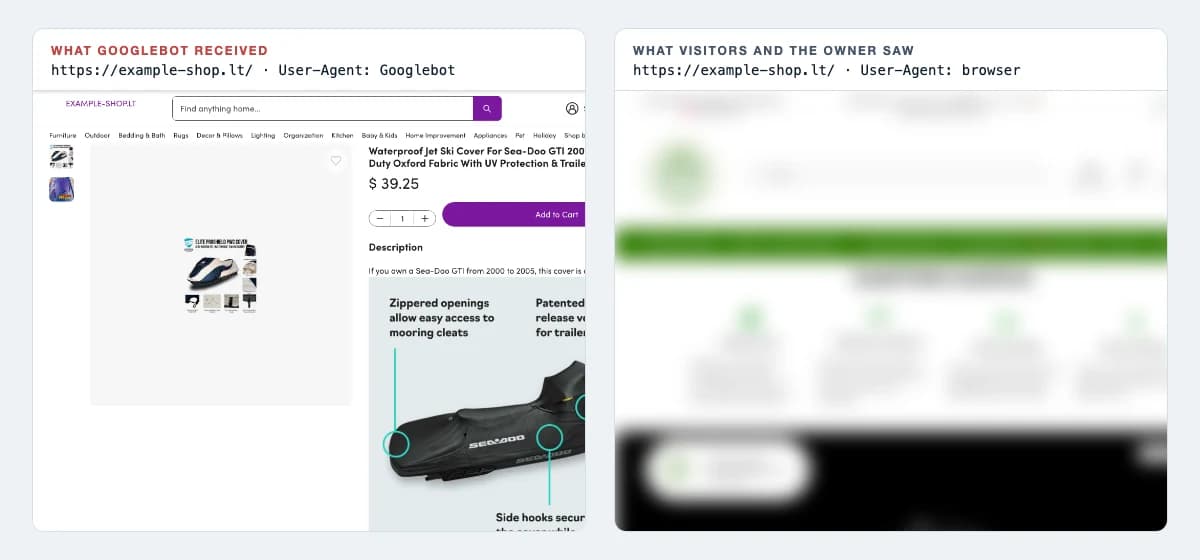
The owner usually sees nothing, because the hack hides from the owner. Google's own wording: many hackers make changes “visible only to Google machines”, and they “often attack only specific user-agents or referrers to avoid detection”. In the incident we took apart, one line added to wp-settings.php loaded a planted file before WordPress started. For every request whose User-Agent was not on its skip list, the file asked the attacker's server what to answer. Googlebot received a foreign shop's product page on every address of the site; the owner, the customers and Bing received the normal site.
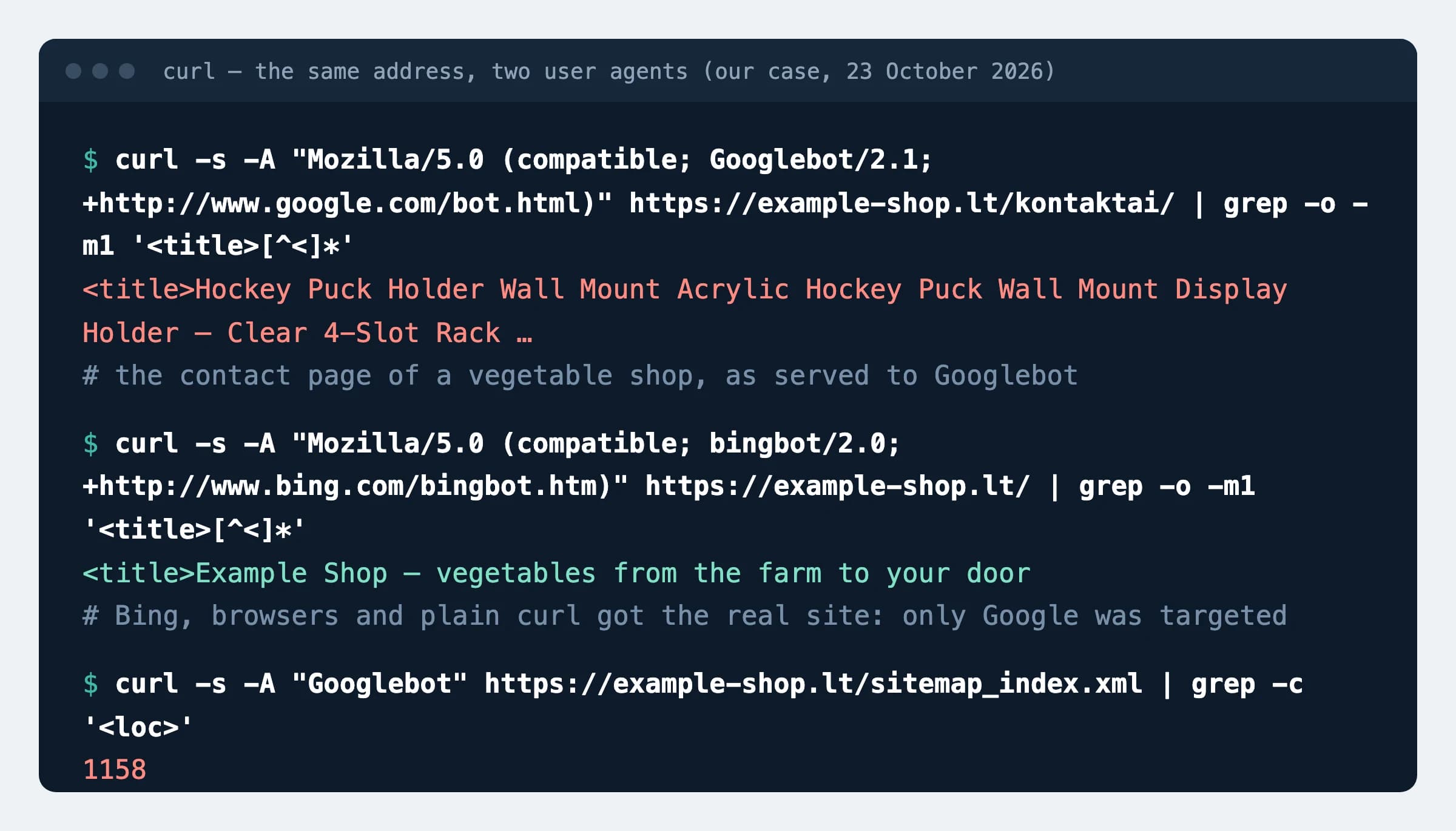
The warning is neither immediate nor guaranteed. In that incident the hack ran for 8 days before it was noticed, a sitemap shown only to Googlebot listed 1,158 foreign addresses, and Google's index of the site grew to about 42,000 pages. On 27 October, twelve days after the file was planted and with 29,600 pages of the site already in Google's index, the Security issues report showed no issues and the Manual actions report was empty. Google says of its own report that the sample list “is not necessarily complete”. A clean report means Google has not flagged the site; it does not mean the site is clean.
Find the cause
Start in Search Console: it names the category. Then check from the command line. Google advises against opening flagged pages in a browser, because an infected page can harm the computer. On Windows run the commands in WSL or Git Bash. Replace example.com with your domain.
Search Console → Security & Manual Actions → Security issuesIf the answer is It means Hacked: URL injection Hacked: Content injection
Google found pages or text that are not yours. The next command shows whether they are hidden from you. Hacked: Code injection
Code was added to your pages. Google's examples: redirects to a malicious site, cryptocurrency mining in the visitor's browser.Cause: Injected code: visitors from Google are sent to another site ↓ Hacked: Malware Deceptive pages Deceptive embedded resources Harmful downloads Links to harmful downloads
Something on the site harms or deceives visitors: a page, a file, a link or embedded third-party code. Chrome can show the red page for these.Cause: A phishing page, harmful file or harmful embedded code on your site ↓ (green check mark, no issues)
Not proof. In our case the report looked like this with 29,600 pages of the site in Google's index, many times more than the shop has. There is nothing to request a review for; go on to the next command. curl -s -A "Mozilla/5.0 (compatible; Googlebot/2.1; +http://www.google.com/bot.html)" https://example.com/ | grep -o -m1 '<title>[^<]*' curl -s -A "Mozilla/5.0" https://example.com/ | grep -o -m1 '<title>[^<]*'If the answer is It means <title>Hockey Puck Holder Wall Mount Acrylic … <title>Your own page title
The same address gives Googlebot one page and a browser another.Cause: Pages that only Google sees (cloaking) ↓ <title>Your own page title <title>Your own page title
This check did not show a difference on the home page. Repeat it on the sample addresses from Search Console. A script can also check the requester's address instead of its User-Agent, and then curl sees nothing: URL Inspection in Search Console fetches the page from Google's own addresses, so compare its HTML too. Then go on.site:example.comIf the answer is It means Results with products, medicines or Japanese text that you never published
Type it into Google Search and look through several pages of results. Then request one of the foreign addresses with both curllines above and compare the two answers. The browser line also returns spam: the pages exist for everyone, cause 2. Only the Googlebot line returns spam: they are cloaked, cause 1.Cause: Spam pages or text that everyone can open ↓Only your own pages
The first pages of results show nothing foreign. site:does not list the whole index, so go on to the next command.curl -s -D - -o /dev/null -A "Mozilla/5.0 (iPhone; CPU iPhone OS 18_0 like Mac OS X) AppleWebKit/605.1.15 (KHTML, like Gecko) Version/18.0 Mobile/15E148 Safari/604.1" -e "https://www.google.com/" https://example.com/ | grep -i -E "^HTTP|^location"If the answer is It means HTTP/2 302 location: https://another-domain.example/…
A visitor who comes from Google on a phone is sent to another site. Repeat without -eand with a desktop browser name: the redirect often disappears.Cause: Injected code: visitors from Google are sent to another site ↓HTTP/2 200
This request was not redirected by the server. A redirect made by JavaScript or a meta tag is not visible this way; if Search Console named code injection, see cause 3 anyway.
1. Pages that only Google sees (cloaking)
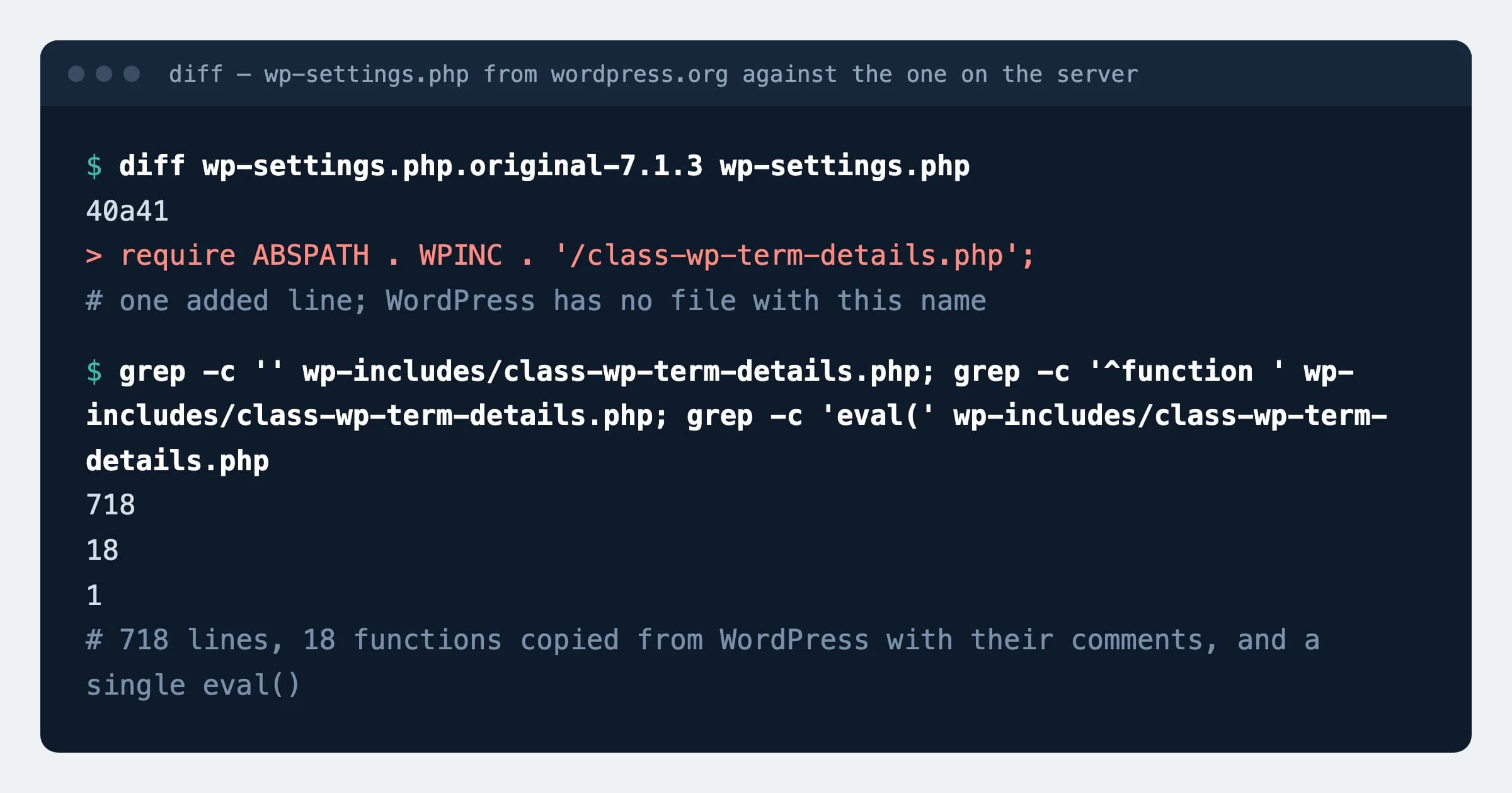
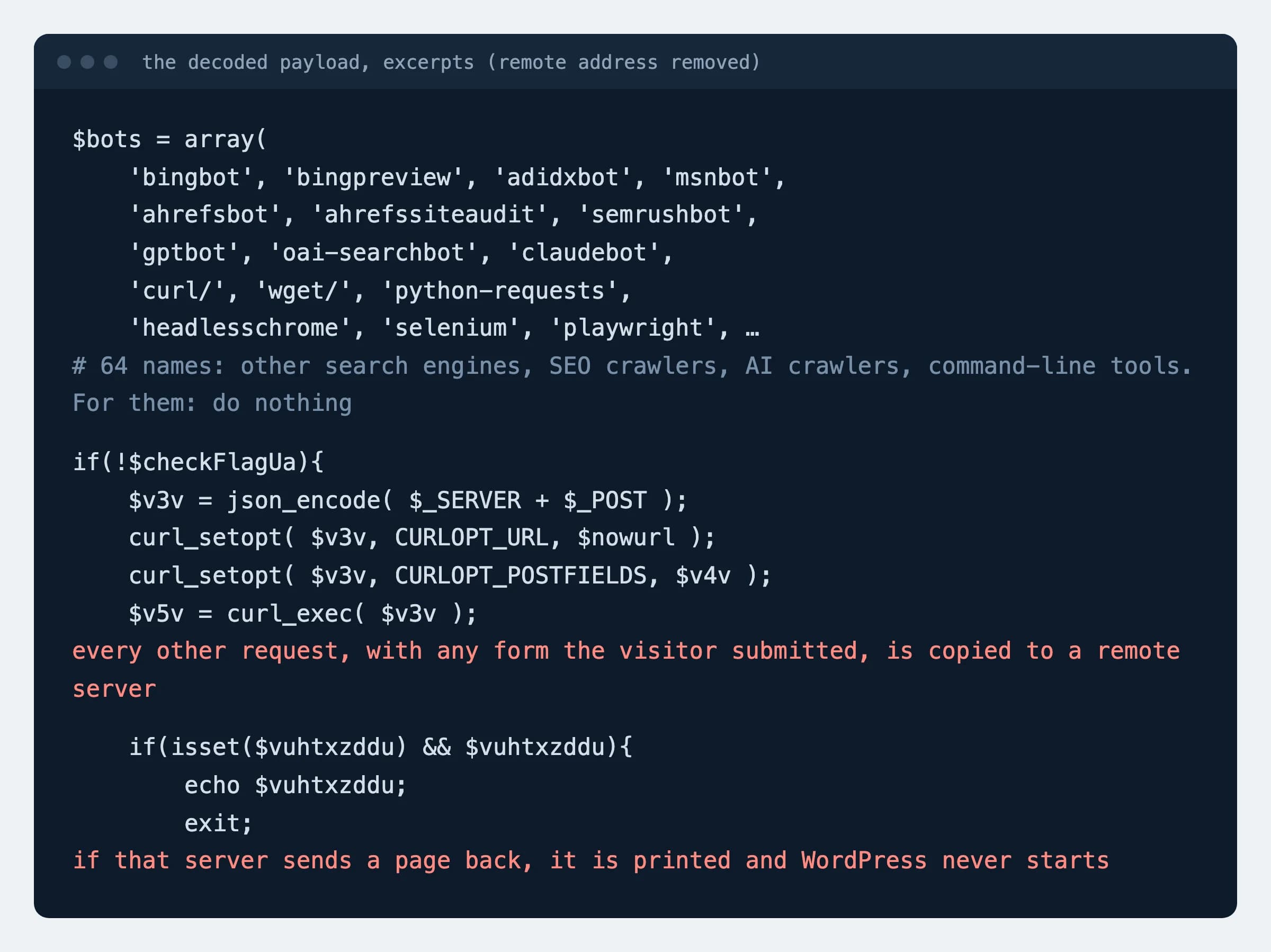
A file on your server answers Google's crawler with someone else's content and everyone else with your site. In our case the file sat in the WordPress core folder under a name that looks like a core file, class-wp-term-details.php. It held 718 lines: 18 functions copied from WordPress with their original comments, and one eval(). The decoded code skips 64 names, among them Bing, SEO crawlers, AI crawlers, curl and headless Chrome, which are the tools an owner or a scanner would check with. For every other request the code sends the server variables and the submitted form fields to the attacker's server; if that server sends a page back, the page is printed and WordPress never starts. What the remote server actually received and kept could not be established.
How to confirm
diff wp-settings.php.original wp-settings.phpThe answer when this is the cause
40a41
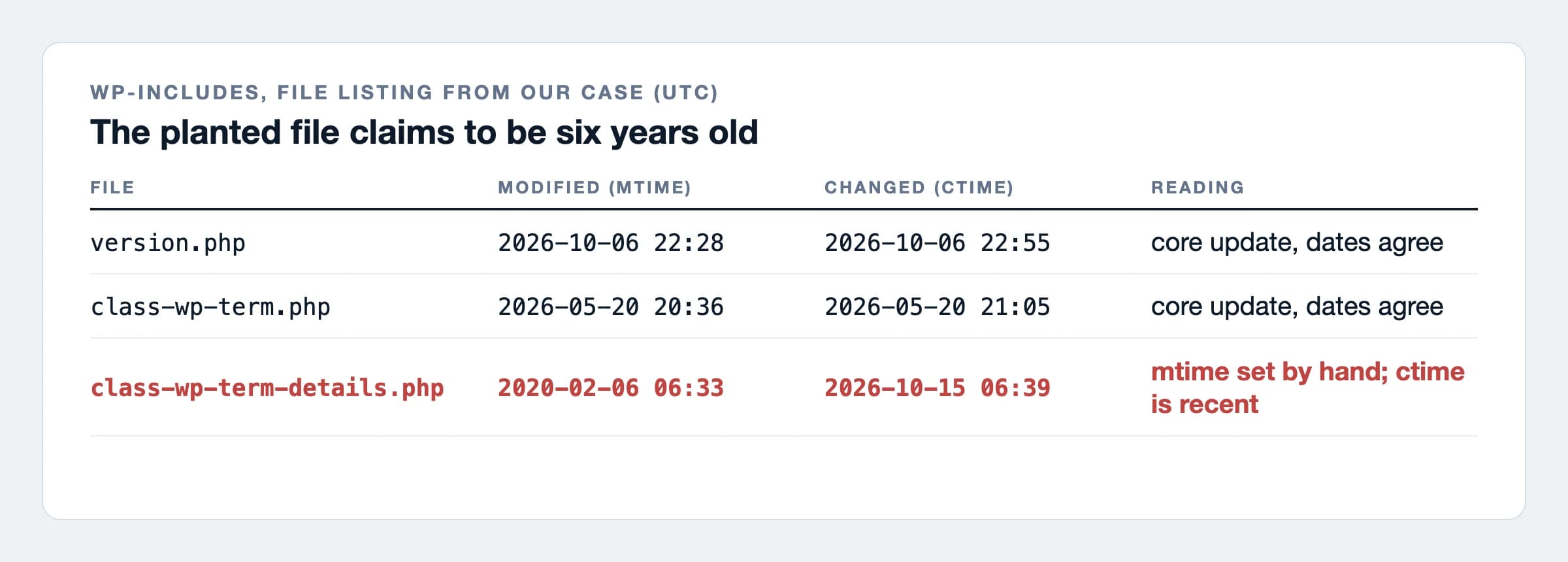
> require ABSPATH . WPINC . '/class-wp-term-details.php';Take the original file from the wordpress.org archive of exactly your version and compare. One added line is enough. wp core verify-checksums --include-root does the same for every core file and also lists files that should not be there, in the site root as well (the option needs WP-CLI 2.8 or later). Do not trust the modification date: the planted file carried one from 2020, while its change time (ls -lc) was 15 October 2026. The change time is a clue for the timeline, not the date of the break-in: in our case the first unauthorised login came earlier.
How to fix it
- Before changing anything, copy the changed files with their dates (
cp -p), a database dump and the web server logs to a place outside the site, write down a checksum of each copy, and ask the hosting provider to keep logs and backups that would otherwise rotate out. You will need them to find the way in, and for the police or the insurer. - Take the site offline. Google's instruction: answer 503 from a static page on a different server. A 503 produced by the hacked server itself is not enough, because harmful content can still be returned with it.
- Replace the CMS core with a clean installation of the same version, not an update on top. Then move the planted file out of the site by hand: a reinstall restores changed core files but does not remove an extra one. Install pending security updates before the site goes back online.
- Check plugins with
wp plugin verify-checksums --all; themes and paid plugins have no public checksums, so compare them with the vendor's archive or reinstall them from it. In our incident the logs show a login to a real administrator account, the upload of a plugin archive and, three seconds later, a request to a PHP file that the official release of that plugin does not contain. That is the most probable way in; the uploaded archive itself was gone by the time we looked. - Look where file checksums do not reach: the database (injected scripts in posts and settings, unknown administrator accounts), scheduled tasks, the
mu-pluginsfolder, PHP files inuploads,.htaccess, and other sites in the same hosting account. - End all sessions. Change every password: CMS administrators, FTP or SSH, database, hosting panel. Delete administrator accounts nobody recognises.
- In Search Console open Users and permissions and Sitemaps. Remove owners and sitemaps you did not add, and remove whatever verifies the unknown owner, otherwise the owner comes back: an HTML file in the site root, a meta tag on the home page, or an
.htaccessrule that imitates the file. Look at Removals and Change of address for requests you did not make. - Make the foreign addresses answer 404 or 410. Google: such pages “will naturally fall out of Google's index with time”. Do not use the Removals tool for your own good pages.
- Bring the clean site back online and make sure Googlebot can fetch it; Google cannot review a site that still answers 503. If the Security issues report lists an issue, request a review there and describe what you removed and how you closed the way in.
Side effects and limits. A core reinstall cleans the core only. If the way in stays open (in our case a working administrator password), the line returns; Google: “Otherwise, your site is likely to be reinfected”. The index also empties slowly, and the report lags: Search Console counted 29,600 indexed pages on the day of our cleanup and 42,300 two weeks later, although every foreign address had answered 410 since the cleanup.
2. Spam pages or text that everyone can open
New pages were created on the site, or links and text were added to existing ones. Search Console calls these URL injection and Content injection. Google describes three common kinds: the Japanese keyword hack (autogenerated Japanese text in randomly named directories, selling fake brand goods), the gibberish hack and the cloaked keywords and link hack. Google's guides for them point to the same places: rules added to .htaccess, new sitemap files and a new owner in Search Console.
How to confirm
curl -s -o /dev/null -w "%{http_code}\n" -A "Mozilla/5.0" https://example.com/ltjmnjp/341.htmlThe answer when this is the cause
200Use an address from the site: search or from the sample addresses in Search Console. Answer 200 to an ordinary request: your server gives this page to ordinary visitors too, by a file or by a rewrite rule. It does not show what other callers receive. A 404 here is not the all-clear; Google warns that hackers show “page not found” to some visitors while the page stays hacked, so repeat the request with the Googlebot name from the triage.
How to fix it
- Copy the evidence and take the site offline as in cause 1.
- Open
.htaccess. If you keep no rules of your own in it, replace it with a new copy, as Google advises; otherwise compare it with a copy from a backup made before the hack and remove the rules that were added. - Delete the foreign directories and files, or restore the affected directories from the last backup made before the hack. Google names both ways.
- Check the sitemap files: remove foreign addresses from yours and delete sitemaps you never created.
- Close the way in: update the CMS, plugins and themes, change all passwords, remove unknown accounts and unknown Search Console owners.
- Check the database and the other places listed in step 5 of cause 1. Bring the clean site back online, let the removed addresses answer 404 or 410, and request a review in the Security issues report.
Side effects and limits. A backup returns the site to its state on the backup date: orders, comments and texts added later are lost, and the hole the attacker used is restored with it. Close the hole before the site goes back online.
3. Injected code: visitors from Google are sent to another site
The page itself looks untouched, but some visitors are redirected. Google's spam policies say the redirect “sometimes depends on the referrer, user agent, or device”: a click from Google Search leads to a suspicious page, while typing the address directly does not. That is why you, who type the address, never see it. Search Console reports this as Code injection.
How to confirm
curl -s -D - -o /dev/null -A "Mozilla/5.0 (iPhone; CPU iPhone OS 18_0 like Mac OS X) AppleWebKit/605.1.15 (KHTML, like Gecko) Version/18.0 Mobile/15E148 Safari/604.1" -e "https://www.google.com/" https://example.com/ | grep -i -E "^HTTP|^location"The answer when this is the cause
HTTP/2 302
location: https://another-domain.example/…The command imitates a phone that arrives from Google. A location: line with a domain that is not yours confirms a redirect made on the server. Hackers also set conditions on the time of day, so one clean answer does not rule it out.
How to fix it
- Copy the evidence as in cause 1. Then look for conditional redirects in the server configuration. Google names
.htaccessandhttpd.conf; look for rules that mentiongoogle,HTTP_REFERERorHTTP_USER_AGENT. - Compare the CMS, plugin and theme files with their originals, and search the database for scripts you did not add, as in cause 1.
- For a redirect made by JavaScript: open URL Inspection in Search Console, view the tested page's HTML and look for a script you did not add. Check third-party scripts too (counters, ad code, widgets): Search Console lists those as “Deceptive embedded resources”.
- Close the way in, then request a review in the Security issues report.
Side effects and limits. Removing a third-party script removes its function as well (statistics, ads, chat). Bring it back only from the vendor's current official code.
4. A phishing page, harmful file or harmful embedded code on your site
This is the cause behind Chrome's red “Dangerous site” page. Search Console lists it as Deceptive pages (content that pretends to be a trusted entity to get a password or a download), Harmful downloads or Links to harmful downloads. On a hacked site it is usually a few files in one directory, for example a copy of a bank's login page, while the rest of the site is untouched.
How to confirm
Search Console → Security issues → open the issueThe answer when this is the cause
Deceptive pages
First detected: (date)
Sample URLs: (a few addresses)
The sample addresses show where to look and the date shows which logs to read. The list is a sample: clean the whole directory, not only the listed addresses. Without Search Console, https://transparencyreport.google.com/safe-browsing/search?url=example.com shows the Safe Browsing status; for a site that is not flagged it says “No unsafe content found”.
How to fix it
- Copy the evidence, then remove the pages and the downloads. Remove the whole directory only after checking that it holds nothing of yours.
- If the issue is “Deceptive embedded resources”, the content comes from a third-party script or ad network: remove that code.
- Find how the files got there and close it: passwords, unknown accounts, outdated software, as in cause 1.
- Request a review once, when everything is fixed and the site is online. If Chrome warns but Search Console lists no issue, Google's form at
safebrowsing.google.com/safebrowsing/report_error/starts a review of a cleaned phishing page. Google: a request sent while the issue is still present can lengthen the next review or get the site marked as a repeat offender.
Side effects and limits. Google marks as a Repeat Offender a site that repeatedly switches between compliant and noncompliant “within a short window of time”; one early request does not do it. A marked site cannot request reviews for 30 days, and the warning stays for that time. Google's current policy page makes no exception for hacked sites, so request the review only after you have checked the cleanup.
What Google's tools and our own checks showed in one real case
A WooCommerce shop, October 2026, the incident described above. The left column is where the owner would have looked; the right column is what was on the server at that moment.
| Where we looked | What it showed | What was true |
|---|---|---|
| Search Console, Security issues, 27 October | No issues | A sitemap served only to Googlebot had listed 1,158 foreign addresses |
| Search Console, Manual actions, 27 October | None | Search Console counted 29,600 indexed pages that day and 42,300 on 9 November |
| The site in a browser | The normal shop | Googlebot received a foreign product page on every address, including addresses that do not exist |
A request under the name bingbot | The normal shop | bingbot is one of 64 names the script leaves alone |
| Modification date of the planted file | 2020-02-06 | Change time 2026-10-15 |
| Plugin and theme updates | All installed | The file sat in the core folder; updates of plugins and themes did not touch it |
Our data
58.7 %
of .lt WordPress sites with a readable version were behind the current release branch
On 16 November 2026, 13,699 of 23,322 .lt WordPress sites whose version could be read from outside were not on the then-current 7.1 branch; another 8,149 hide the version. Google lists “an older, insecure version” of a CMS among the typical ways hackers get in. The figure counts sites behind the current branch; it does not count vulnerable or hacked sites. An up-to-date site is not immune either: in our own case everything was current and the way in was an administrator password. Open dataset of .lt websites, DOI 10.5281/zenodo.24282573
Check that it works
Ask for one of the foreign addresses as Googlebot, then repeat the two-title command from the triage on the home page and on two or three of the affected addresses.
curl -s -o /dev/null -w "%{http_code}\n" -A "Mozilla/5.0 (compatible; Googlebot/2.1; +http://www.google.com/bot.html)" https://example.com/one-of-the-foreign-addressesExpected
410404 is equally good. Both titles in the triage command must now be your own, the core checksums must pass, and the Security issues report must show the green check mark after the review. Repeat the checks a week later: Google warns that a site can hold several independent hacks, and one closed hole does not prove there is no second.
Where it comes from and what it leads to
Where it comes from
- A stolen or guessed administrator password. In our case the login limiter recorded 36 to 108 password attempts a day against one administrator name around the day of the break-in.
- An outdated CMS, plugin or theme. Google names it among the typical ways in.
- A plugin or theme taken from an unofficial source, or a tampered copy of a real one.
- Forgotten copies of old sites in the same hosting account. In our case one of them had stayed infected for a year.
What it leads to
- CMS detected: WordPress (OUTDATED), the version is publicly disclosedThe version is visible from outside, and an old one tells an attacker which holes to try
- WordPress username is disclosed: /?author=1 redirects to /author/name/The administrator's login name is disclosed; that is not a hole by itself, but it makes targeted password guessing easier
- WordPress user list via the REST API: public names and IDsThe same list of login names through the REST API
What to write to the hosting provider
No access to the server files or logs? Send this to the hosting provider before anything is cleaned.
Hello,

Google reports that example.com may be hacked. Before anything is changed, please:

1. Do not delete or restore anything yet.
2. Send me the web server access and error logs for the last 30 days, and tell me how far back your logs and backups go.
3. Send me a list of files in the site's directory whose change time (ctime) is later than [date], including the CMS core folders.
4. Tell me whether other sites or old copies exist in the same hosting account.
5. Tell me which FTP, SSH and panel logins were used for this account in the last 30 days, and from which addresses.

Thank you.Sources
- Google Search Help: “This site may be hacked” message
- Google Search Help: “This site may harm your computer” notification
- Google Chrome Help: Manage warnings about unsafe sites (“Dangerous site”)
- Chromium source: the texts of the Safe Browsing warning pages
- Search Console Help: Security issues report (categories, sample URLs, review)
- Search Console Help: Manual actions report
- Google Search Central: spam policies (hacked content, cloaking, sneaky redirects)
- Google Search Central: Safe Browsing Repeat Offenders (30 days without reviews)
- Google, web.dev: Quarantine your site (503 from outside the compromised server)
- Google, web.dev: Clean and maintain your site (clean installation, 404 for removed pages)
- Google, web.dev: Request a review
- Google, web.dev: Fix the Japanese keyword hack (owners, sitemaps, .htaccess)
- Google Transparency Report: Safe Browsing site status
- AGuard incident case study: a core implant that served a foreign shop to Googlebot
- AGuard: open dataset of 125,935 .lt websites, 16 November 2026
How we tested
The Googlebot and Bingbot requests, the sitemap count, the file comparison, the file dates and the script excerpts come from one incident we handled in October 2026 (evidence captured 23–26 October 2026, each file with a SHA-256 checksum). The site is shown as example-shop.lt or example.com and its real page title is replaced; the foreign titles, the added line, the file name and the dates are unchanged. The address of the attacker's server and the working code are not published. The Chrome warning is Chrome 158's own built-in demonstration page, captured on 24 November 2026. The Transparency Report answer was read for example.com on the same day. The Search Console reports of that site were read on 27 October and 9 November 2026. The redirect answer, the 200 answer of a spam page and the 410 answer in the final check are the expected ones, not our own runs; `ltjmnjp/341.html` is the example address from Google's guide.