
Wiki / WordPress and CMS
Risk: CMS detected
Your site states its WordPress version in the page source, and when the line says OUTDATED, that version is behind the current release. Update first: hiding the number takes five minutes and fixes nothing.
What it does not mean. It does not prove the site has been hacked, and a hidden version does not prove the site is up to date. The report reads only the generator tag and compares it with the current release, which it takes from WordPress.org once a day. You can check the same thing yourself with the command below.
- In our report
- Risk (red) when more than one release behind, otherwise warning (yellow); category weight 1.5 of 2.0
- Time to fix
- Updating: 10–30 minutes with a backup; hiding the version: 5 minutes
- Can it break things
- An update can: check plugins and the theme afterwards. Hiding the version broke nothing in our test
How to fix it
On 18 November 2026 the WordPress.org API returned 7.1.4 (released 28 October 2026) as the current version. WordPress.org calls only the most recent release of the 7.1 series safe to use and actively maintained.
Find the current version (WordPress.org API, run on 18 November 2026)
curl -s https://api.wordpress.org/core/version-check/1.7/ | grep -o '"version":"[0-9.]*"' | head -1
curl -s https://api.wordpress.org/core/stable-check/1.0/ | grep -o '"6.4.2" *: *"[a-z]*"'The first line printed "version":"7.1.4". The second asks about one specific version and printed "6.4.2" : "insecure"; the possible answers are latest, outdated and insecure. That day the API marked 959 versions insecure, 24 outdated and one latest.
Update (WP-CLI 2.12.0, tested 7.1.3 → 7.1.4)
wp core check-update
wp core update
wp core update-dbBack up the files and the database first. Without WP-CLI: Dashboard → Updates → Update Now. Minor security releases install automatically by default; if yours did not, automatic updates are switched off or failing.
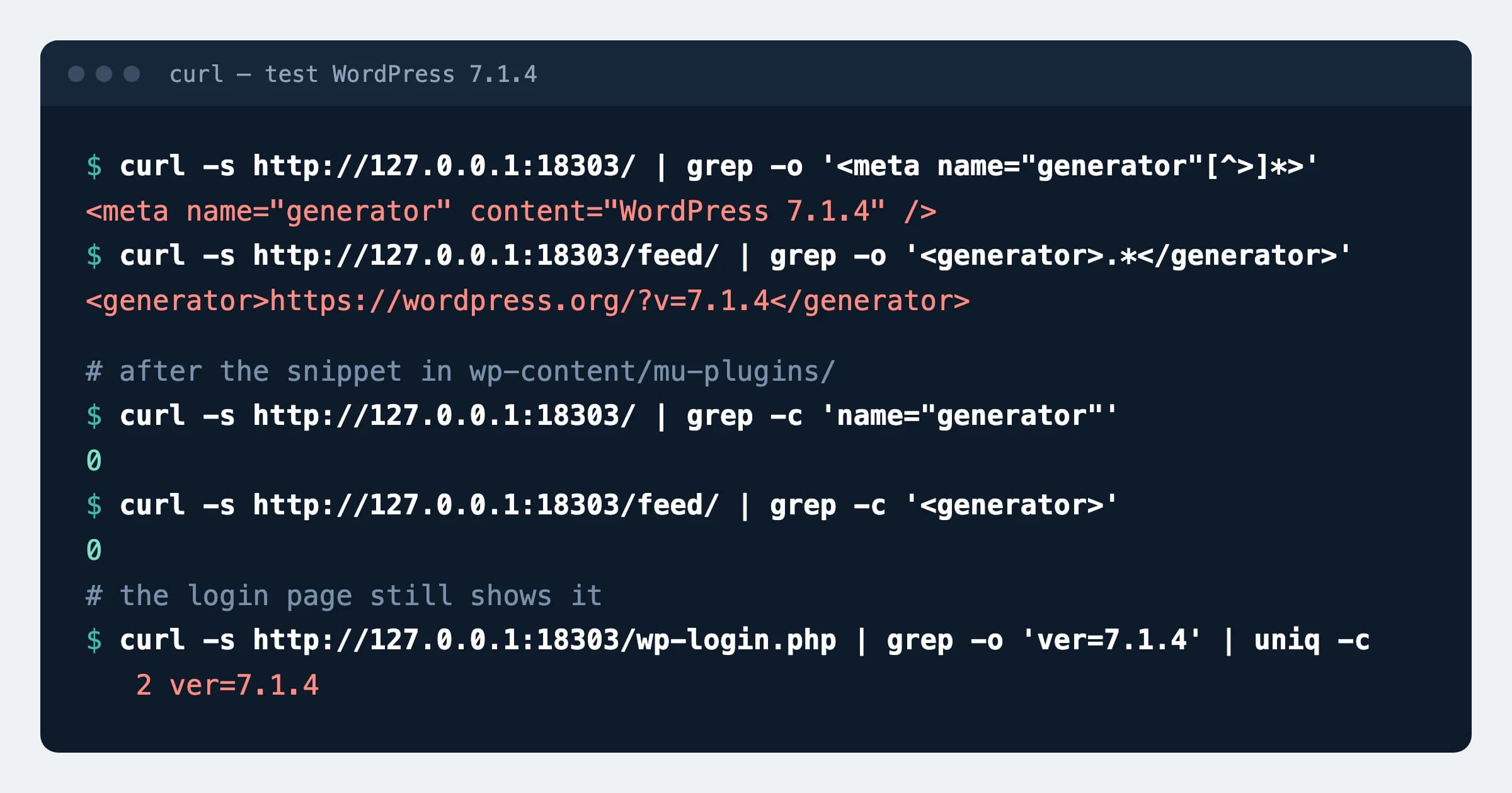
Hide the version (tested on WordPress 7.1.4, PHP 8.4), file wp-content/mu-plugins/hide-version.php
<?php
// <head> and RSS/Atom feeds
add_filter( 'the_generator', '__return_empty_string' );

// ?ver=<WordPress version> on core scripts and styles
function aguard_strip_wp_ver( $src ) {
    if ( $src && strpos( $src, 'ver=' . get_bloginfo( 'version' ) ) !== false ) {
        $src = remove_query_arg( 'ver', $src );
    }
    return $src;
}
add_filter( 'style_loader_src', 'aguard_strip_wp_ver' );
add_filter( 'script_loader_src', 'aguard_strip_wp_ver' );On the test site the generator tag, the <generator> line in the feed and ?ver=7.1.4 on the home page disappeared; plugin and theme ?ver= values stay. After this our report shows the line in green although the site is no safer than before.
How to check
curl -s https://example.com/ | grep -i 'name="generator"'Expected
Once hidden: no output. Before: <meta name="generator" content="WordPress 7.1.4" />The version itself is shown by wp core version or Dashboard → Updates; compare it with the API answer.
What can break
- Removing
?ver=from core files removes the cache-busting value: after an update, browsers and CDNs may serve old scripts for a while. - A major update (7.0 → 7.1) can break old plugins or the theme. A minor one (7.1.3 → 7.1.4) carries fixes only, but take a backup in both cases.
Possible values
Where WordPress shows its version and what the code above removes (checked on 7.1.4).
| Place | Removed | Comment |
|---|---|---|
<meta name="generator"> on every page | Yes | The only place our check reads |
<generator> at /feed/ | Yes | Same the_generator filter |
?ver=7.1.4 on core scripts and styles | Yes, on public pages | Plugin versions stay visible |
/wp-login.php (load-styles.php?…ver=7.1.4) | No | The version was still there after the code |
/readme.html | Not needed | The file stated the version up to 4.6 and no longer does from 4.9 (we checked the files in the WordPress repository) |
Our data
18.67%
of 73,386 inspected .lt websites (13,699) disclose a WordPress version older than the release that was current at the time. Sites that hide the version are not counted, so the real share is higher. Dataset, 16 November 2026
Sources
- WordPress.org API: current version
- WordPress.org: release list and which series is maintained
- WordPress documentation: upgrading and automatic updates
- WordPress developer documentation: the_generator filter
- WordPress documentation: hardening
- AGuard: security dataset of Lithuanian websites, DOI 10.5281/zenodo.24282573
Changes
- Page published; version checked against the WordPress.org API, code and update tested on WordPress 7.1.4.