
Wiki / Encryption
Risk: TLS certificate
Once a certificate has expired, browsers show a warning instead of the site and curl and other programs refuse to connect: fix it immediately. “Valid for N more days” appears when fewer than 14 days are left: the site still works, but automatic renewal has most likely failed.
What it does not mean. It does not mean the site was hacked or that the encryption is weak. This line checks the expiry date only: it does not show an incomplete chain or a name mismatch, so check those with the commands below.
- In our report
- Expired: risk (red); fewer than 14 days left: warning (yellow); category weight 2.0 of 2.0
- Time to fix
- 10 minutes if certbot is already on the server
- Can it break things
- Renewing breaks nothing, but without a server reload visitors keep getting the old certificate
How to fix it
Certbot renews a certificate by itself once less than a third of its lifetime remains (30 days for a 90-day certificate). With fewer than 14 days left, find out why renewal did not run. The certbot commands come from the Certbot 5.10.0 documentation: we could not run them on the test server.
Certbot: check renewal (from the documentation)
certbot certificates
certbot renew --dry-runThe second command tries a renewal against the Let's Encrypt staging server and leaves the real certificates alone. If it passes but the certificate is old, check that certbot renew appears in systemctl list-timers or in /etc/crontab, /etc/cron.*/*.
Certbot: renew and reload the server (from the documentation)
certbot renew --deploy-hook "systemctl reload nginx"The --deploy-hook command runs after each successful issuance. On Apache use your system's reload command.
nginx: full chain (tested on 1.26.3)
ssl_certificate     /etc/letsencrypt/live/example.com/fullchain.pem;
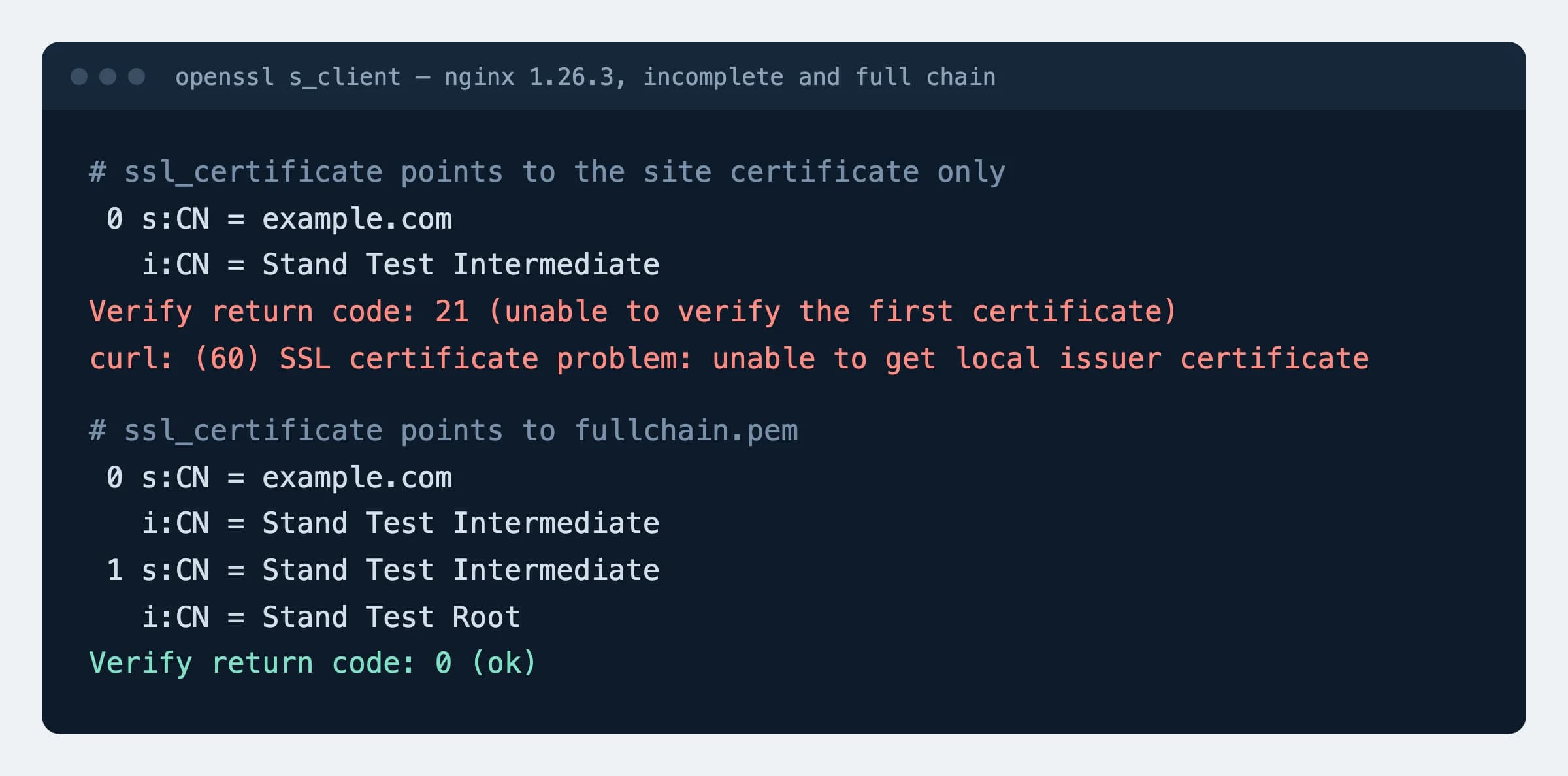
ssl_certificate_key /etc/letsencrypt/live/example.com/privkey.pem;With the site certificate alone and no intermediate, openssl on the test server reported Verify return code: 21 (unable to verify the first certificate).
Apache: full chain (tested on 2.4.59)
SSLCertificateFile    /etc/letsencrypt/live/example.com/fullchain.pem
SSLCertificateKeyFile /etc/letsencrypt/live/example.com/privkey.pemIntermediates in the same file work from 2.4.8. SSLCertificateChainFile has been obsolete since that version.
Name mismatch (tested with OpenSSL 3.0.13 and 4.1.0)
echo | openssl s_client -connect example.com:443 -servername example.com 2>/dev/null | openssl x509 -noout -ext subjectAltNameThe answer, for example DNS:example.com, DNS:*.example.com, must contain every name the site is opened with, usually www too. If one is missing, issue the certificate again with all names.
How to check
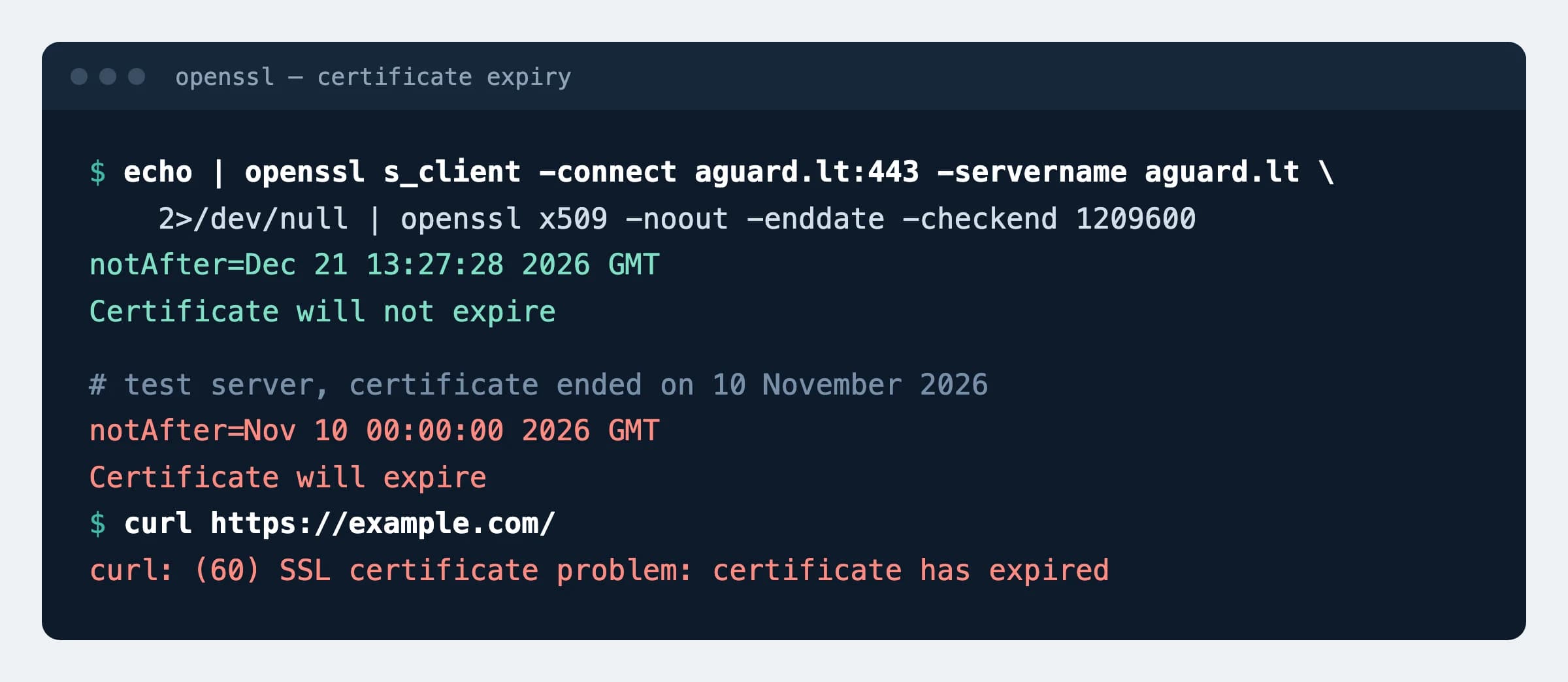
echo | openssl s_client -connect example.com:443 -servername example.com 2>/dev/null | openssl x509 -noout -enddate -checkend 1209600Expected
notAfter=Dec 25 22:56:35 2026 GMT
Certificate will not expire
1209600 seconds is 14 days, the threshold of our scan. Certificate will expire means expired or expiring within that time. For chain and name run echo | openssl s_client -connect example.com:443 -servername example.com -verify_hostname example.com 2>/dev/null | grep -m1 "Verify return code": it must say 0 (ok); 10 is expired, 21 an incomplete chain, 62 a name mismatch.
What can break
- A renewed file without a server reload: on the test server nginx kept serving the old
notAfterafterfullchain.pemwas replaced, until it received a reload signal. - With the chain file in the wrong order (intermediate first, site certificate second) nginx does not start:
key values mismatch. On the test servernginx -tcaught it. - Browsers often hide an incomplete chain because they remember intermediates, but curl drops the connection:
unable to get local issuer certificate.
Possible values
Lifetimes are getting shorter, so renewing by hand stops being an option. Dates checked on 18 November 2026 at the CA/Browser Forum and Let's Encrypt.
| Date | What changes | What it means |
|---|---|---|
| 4 June 2025 | Let's Encrypt stopped sending expiry e-mails | In effect: no warning arrives, watch the date yourself |
| 15 January 2026 | Let's Encrypt 6-day (160-hour) certificates generally available, profile shortlived | Opt-in only; no plan to make it the default |
| 15 March 2026 | Maximum lifetime of a public TLS certificate: 200 days (was 398) | In effect, paid certificates included |
| 10 February 2027 | Let's Encrypt default lifetime: 64 days instead of 90 | Renew at two thirds of the lifetime, not on a fixed day count |
| 15 March 2027 | Maximum lifetime: 100 days | A paid certificate is replaced at least four times a year |
| 16 February 2028 | Let's Encrypt default lifetime: 45 days | Renewing “every 60 days” no longer works |
| 15 March 2029 | Maximum lifetime: 47 days | Without automation: manual work every six weeks |
Sources
- CA/Browser Forum: Baseline Requirements 2.3.1, validity dates (section 1.2.2)
- CA/Browser Forum: ballot SC-081v3
- Let's Encrypt: Expiration Notification Service Has Ended
- Let's Encrypt: Decreasing Certificate Lifetimes to 45 Days
- Let's Encrypt: 64-Day Certificate Lifetimes Coming Feb 2027
- Let's Encrypt: 6-day and IP Address Certificates are Generally Available
- Certbot documentation: renewing certificates
- nginx documentation: SSL certificate chains
- Apache documentation: mod_ssl, SSLCertificateFile
Changes
- Page published; openssl commands and the nginx and Apache chains tested, lifetime dates checked against the sources.