
Wiki / Email
Warning: Mail server identification (HELO)
Your mail server calls itself by a name that is not a real internet name (localhost, vps123.local), or its name, IP address and reverse DNS record do not agree. Receiving servers use this to tell a maintained mail server from an infected machine, so your messages land in spam more often.
What it does not mean. It does not mean your mail is already rejected: RFC 5321 even forbids refusing a message solely because the greeting name does not match the IP address. But since 1 February 2024 Google requires valid forward and reverse DNS records from all senders, and Spamhaus calls such names a common misconfiguration. We read the greeting the server shows on port 25; when sending, Postfix and Exim use the same name by default.
- In our report
- Warning (yellow), category weight 0.8 of 2.0; a technical name or a mismatch also adds the line “Risk of being blocked for spam”
- Time to fix
- 10 minutes on the server; the PTR record is changed by the provider, on its terms
- Can it break things
- No, provided the new name gets its A record first
How to fix it
Four things must agree: the server's name, the A record of that name, the PTR record of the IP address, and the greeting. We check self-hosted servers only; Google Workspace, Microsoft 365, Zoho and Proton take care of this themselves.
Postfix (tested with 3.2.2 on a copy of the configuration)
# /etc/postfix/main.cf
myhostname = mail.example.comAfter the change postconf -x smtp_helo_name smtpd_banner showed the new name in both places: when sending and in the greeting. Then reload Postfix.
Exim (setting from the Exim documentation)
primary_hostname = mail.example.comOn our server with Exim 4.97, exim -bP primary_hostname shows mail.aguard.lt. When it is not set, Exim takes the system's host name, which on hosted servers is often a technical one.
DNS: the name must point to the server
mail A 192.0.2.10PTR record: a request to your hosting provider
10.2.0.192.in-addr.arpa. PTR mail.example.com.You cannot create this record in your own domain's DNS zone: the reverse zone belongs to the owner of the IP address. Look for “Reverse DNS” or “PTR” in the provider's panel, or write to support: “Please set the PTR of 192.0.2.10 to mail.example.com”.
How to check
Put your mail server's IP in place of the address (our MX line shows it).
dig +short -x 192.0.2.10Expected
mail.aguard.lt.Then back again: dig +short A mail.aguard.lt must return the same IP address. To see the greeting: printf 'QUIT\r\n' | nc -w 5 mail.aguard.lt 25; the line must start with 220 mail.aguard.lt. Many internet providers block port 25 on home connections; the two dig commands are enough then.
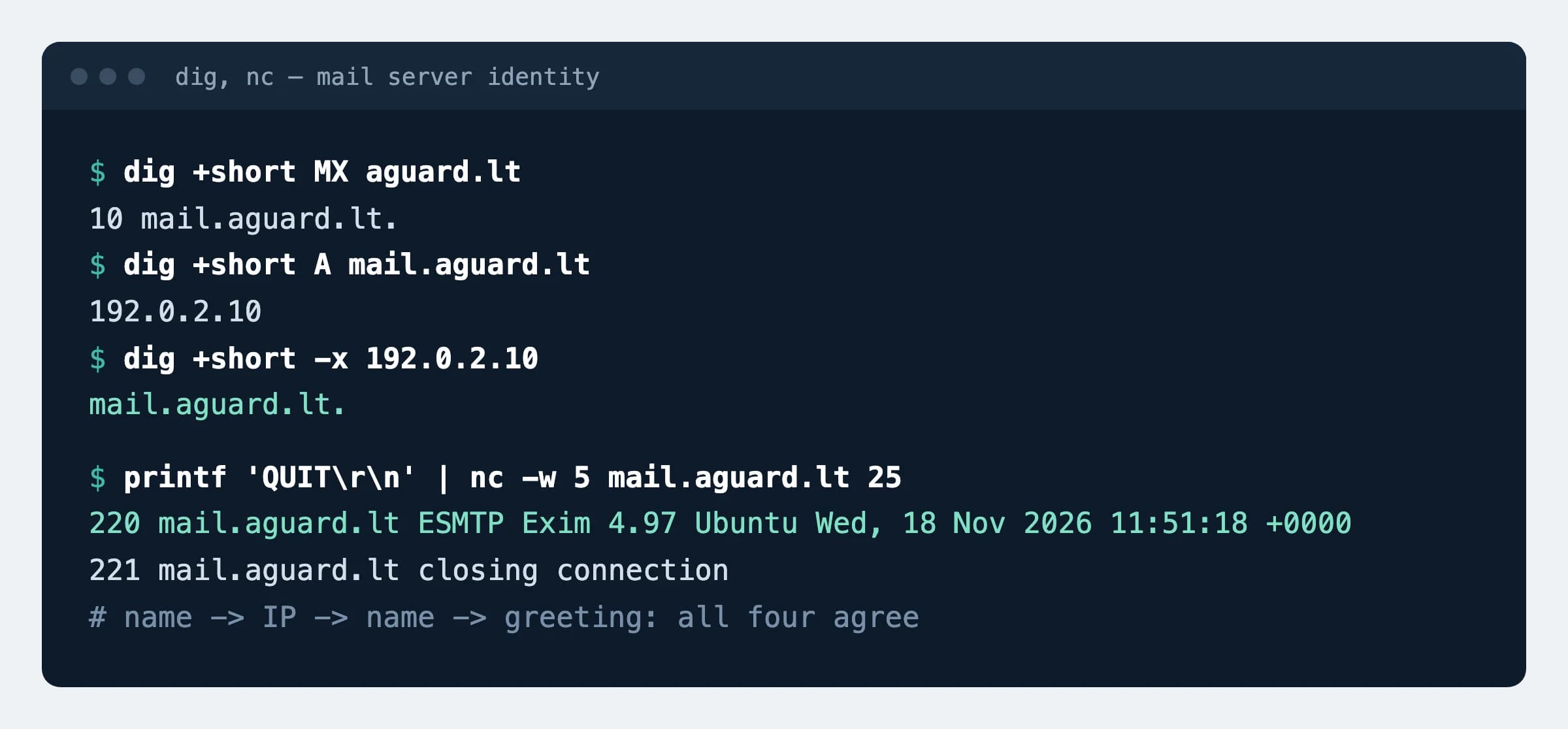
220 greeting all say mail.aguard.lt. Our server's IP address is replaced with an example one.What can break
- If the new name has no A record yet, the greeting gets worse than before: a name that does not exist in DNS. DNS first, then the server setting.
- On shared hosting the PTR belongs to the whole server and you cannot change it for your domain. What matters then is that the provider has set it properly.
Possible values
Three warning lines. We treat a name as technical when it has no dot, contains localhost, ends in .local, .localdomain, .lan, .internal, .home or .intra, or starts with vps123., srv1., server., host., win- or ip-.
| Line | What is wrong | Who fixes it |
|---|---|---|
| The server identifies itself with a technical name | The mail software has no real name | You or the server administrator: myhostname, primary_hostname |
| Identifies itself as X, while the reverse record is Y | The name X does not point to this IP, and the PTR gives another name | You (A record) and the provider (PTR) |
| The reverse (PTR) record is a technical one | The name is fine, but the IP still has the provider's default PTR | The hosting provider only |
| Could not connect to port 25 | An information line: the server did not answer or restricts access | Nothing to fix |
Sources
- RFC 5321: SMTP, sections 4.1.1.1 and 4.1.4 (the EHLO name and verifying it)
- Google: email sender guidelines (forward and reverse DNS)
- Spamhaus: the CSS blocklist, HELO and reverse DNS requirements
- Postfix: myhostname, smtp_helo_name, smtpd_banner
- Exim: primary_hostname
Changes
- Page published; requirements checked against RFC 5321 and the Google and Spamhaus pages.